91 screens across 11 modules. One database. Your data,
your code, a flat monthly cost that does not grow with your headcount.
Prepared for[ Client name ]
Prepared byAziz Saif
Date2026-08-20
Revision1.0
aziz@azizsaif.com+971 55 649 2370azizsaif.com
Contents
1
Executive summaryWhat you get, what it costs, and why build rather than buy
2
Scope of the systemAll 91 screens at a glance, grouped by module and delivery phase
3
ArchitectureHow the pieces fit together, and the full technology stack
4
The system, screen by screen29 screenshots of the working demo, each with what you are looking at
5
The screen catalogueEvery one of the 91 screens: who uses it, what is on it, and why it matters
6
Data modelThe six tables everything else hangs off, field by field
7
Getting data in and outCSV, Excel and PDF import; CSV, Excel, PDF and JSON export
8
Security & complianceFourteen controls, by priority, plus the UAE data-protection position
9
Hosting & databaseWhy PostgreSQL, and three hosting options compared
10
InvestmentMonthly running cost, build cost, and the comparison against packaged ERP
11
Delivery planSixteen weeks, week by week, with a definition of done for each
12
Assumptions, exclusions & risksWhat is in, what is not, and what could go wrong
13
Next stepsHow we start
A note on the live demo
This proposal is accompanied by a working demonstration, not a slide deck of mock-ups.
43 of the 91 screens described here are clickable today: you can filter a table, open a record,
switch between six user roles and watch the permissions change, upload a spreadsheet, and download a PDF.
Everything in section 7 of this document can be verified by using it.
1 · Executive summary
You are being asked to choose between renting an ERP for ever and owning one outright.
This proposal covers the second option: a system built to your process, on standard technology, that costs
the same whether five people use it or fifty.
91Screens specified
Across 11 modules, each with its purpose, data and users documented in section 4.
43In the phase-1 MVP
Weeks 1–8. The smallest system that can run the business end to end.
~$134Monthly infrastructure
At 10–30 users. Flat — the 31st user costs nothing extra.
16Weeks to full delivery
Including migration, a parallel run and a security review.
The commercial argument in one paragraph
Packaged ERP is priced per seat; a system you own is priced per server. At five users, buying Odoo or Zoho is
genuinely cheaper and you should do it. At twenty-five users you would pay roughly $9,300 a year to
Odoo, $11,100 to Zoho One or $27,300 to SAP Business One — for software you cannot
change and do not own. The same twenty-five users on your own system cost about $1,600 a year in
infrastructure. The build pays for itself somewhere between year one and year three, and after that the gap compounds.
What you actually get
One database, not five spreadsheets. Clients, inventory, purchasing, invoicing, finance, people and projects in a single system where the numbers reconcile because they come from the same place.
Your existing data, in on day one. A CSV, Excel and PDF import pipeline that maps columns automatically, validates every row and refuses to write bad data — because if your team cannot get their spreadsheets in, they keep the spreadsheets.
Permissions that hold. Roles enforced in the database rather than hidden in the interface, so a masked salary or cost price never reaches an export, an API call or a screenshot.
An audit trail nobody can edit. Written by database trigger, insert-only for every application role including the owner's, kept for seven years.
Compliance built in, not bolted on. Per-line VAT at 5%, gapless invoice numbering, a WPS payroll file the bank will accept, and visa and document expiry alerts.
The code and the data. Both yours. Standard PostgreSQL and standard TypeScript, so any competent developer can pick it up.
What we recommend you do not do
Do not build all 91 screens before going live. Phase 1 is deliberately the smallest thing that can run the
business: take an order, hold stock, buy more, invoice it, get paid, see the number. Everything else waits until
people are using the first version and telling you what is actually missing — which is never quite what the
requirements document said.
2 · Scope of the system
91 screens, 11 modules, three delivery phases. This table is the contractual scope;
section 4 documents each screen individually.
Module
Screens
Phase 1
Phase 2
Phase 3
What it covers
Core & access
8
6
2
0
Sign-in, security challenge, company setup, dashboards, search and notifications
Clients & CRM
8
3
4
1
The customer master, contacts, opportunity pipeline, statements and credit control
Sales
10
8
2
0
Quotation through order, delivery, tax invoice, credit note, receipt and receivables ageing
Inventory
11
6
4
1
Item master, stock by location, the movement ledger, transfers, counts and reorder alerts
Purchasing
8
5
3
0
Suppliers, requests, purchase orders, goods receipt, bills, three-way match and payables
Finance
10
3
5
2
Chart of accounts, journals, banking, expenses, VAT, and the three statutory statements
People
8
0
5
3
Employee records and documents, attendance, leave, payroll, WPS and expiry alerts
Vessels & Jobs
11
3
7
1
Data in / out
5
4
1
0
The import wizard, field mapping, error queue, export centre and scheduled reports
Admin & security
8
4
3
1
Users, the permission matrix, audit trail, approvals, documents, backup and settings
Reporting
4
1
1
2
The standing report library, dashboards, a report builder and the alert engine
Around forty of these are the same screen with different columns — a list, a filter bar, a detail panel, a form.
That pattern is built once and the rest are generated from the database schema, which collapses 91 screens into
roughly fifteen genuinely distinct pieces of work. The ones that actually consume time are the invoice builder, the
goods-receipt posting, the payroll run, the import wizard and the VAT schedule. The estimate in section 9 is built
on that basis, not on multiplying 91 by a day rate.
3 · Architecture
Nothing exotic. Every choice below is deliberately boring, widely hired for, and something you can
walk away from — which matters more over ten years than any benchmark.
ClientsBrowser on desktop, tablet and phoneWarehouse barcode scannerEmail and WhatsApp out
Validation lives in exactly one place, next to the schema. A value typed into a form, pasted in from Excel or
pushed through the API passes through the same rules. The moment there are two definitions of what a valid invoice
looks like, the data starts to drift — and every ERP that has gone bad, went bad precisely there.
The full technology stack
Layer
Choice
Why this one
Front end
Next.js 15 · React 19 · TypeScript
Server components keep large tables fast; one language front to back; the largest hiring pool of any framework.
UI kit
Tailwind CSS · shadcn/ui · TanStack Table
You own the component code rather than renting a design system. Handles 50,000-row grids with sorting and filtering.
API
tRPC (typed) with a REST surface for integrations
Renaming a field becomes a compile error instead of a runtime failure discovered by a user.
Schema & migrations
Prisma or Drizzle with versioned SQL
The schema is the contract. Migrations are reviewed like code, run in CI, never applied by hand to production.
Database
PostgreSQL 16
Real transactions — mandatory for double entry. Row-level security, JSONB for custom fields, full-text search included.
Cache & queue
Redis with BullMQ
Imports, PDF generation, email and scheduled reports run off the request cycle, so a 12,000-row file never times out a browser.
File storage
S3-compatible object storage
Invoices, receipts and staff documents behind signed URLs that expire in minutes. Never in the database, never public.
Authentication
Managed auth with TOTP MFA, SSO-ready
Session handling is never worth building yourself. Google Workspace SSO the day you exceed ten staff.
File parsing
PapaParse · SheetJS/ExcelJS · pdf-parse
Server-side and streamed, so memory use stays flat regardless of file size.
Document AI
Claude API or AWS Textract
Only for scans with no text layer. Returns a confidence score per field; anything below the gate stops for a human.
PDF output
Puppeteer, server-side
An invoice looks identical whether emailed by a scheduled job or printed from a phone.
Email & messaging
Resend or SES · WhatsApp Business API
Invoice delivery, statement runs, approval requests and expiry alerts.
Observability
Sentry · structured logging · uptime checks
You want to hear about a failed goods-receipt posting from an alert, not from your storekeeper three days later.
CI/CD
GitHub Actions
Typecheck, lint, tests and a migration dry-run against a copy of production before anything deploys.
Testing
Vitest (unit) · Playwright (end to end)
Accounting logic gets known-answer fixtures. The critical click-paths get browser tests.
Edge & WAF
Cloudflare
DNS, web application firewall, rate limiting and DDoS protection in front of everything.
4 · The system, screen by screen
Captured from the working demonstration, not drawn as mock-ups. Every screen below is
clickable today at the demo address on the cover — you can filter these tables, open these records,
switch roles and watch the columns change, upload a spreadsheet and download the result.
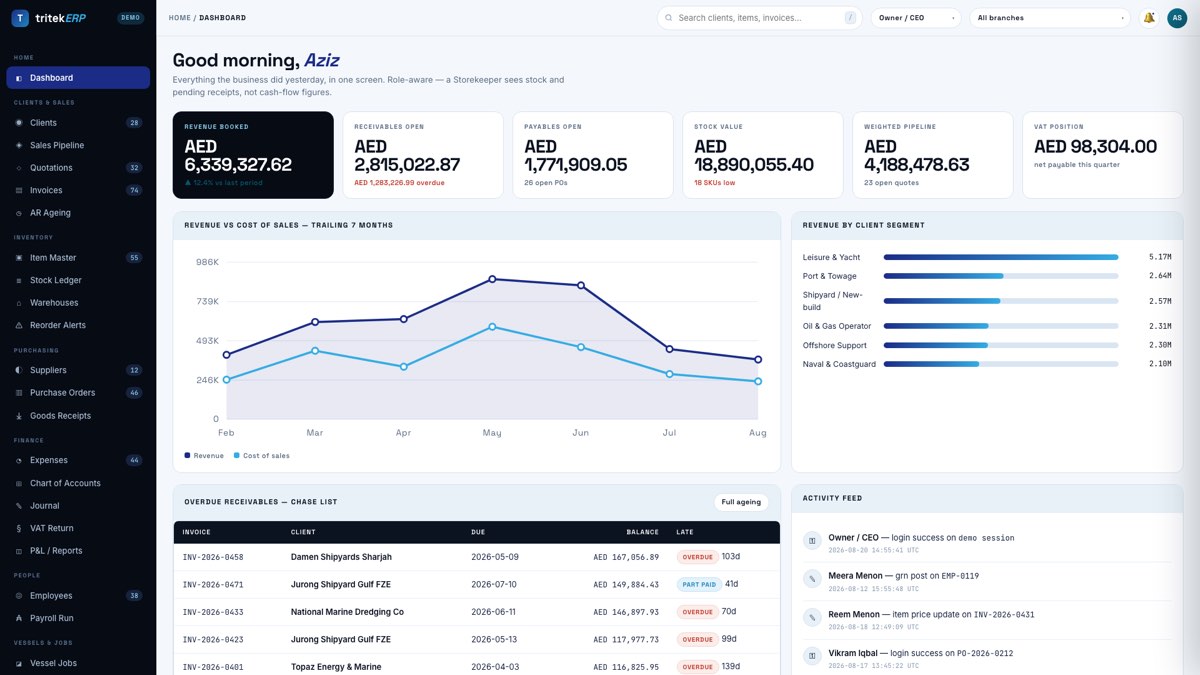
01
Dashboard
Home
Everything the business did yesterday on one screen. The tiles are role-aware: a storekeeper opens on stock levels and pending receipts rather than cash-flow figures they will learn to ignore.
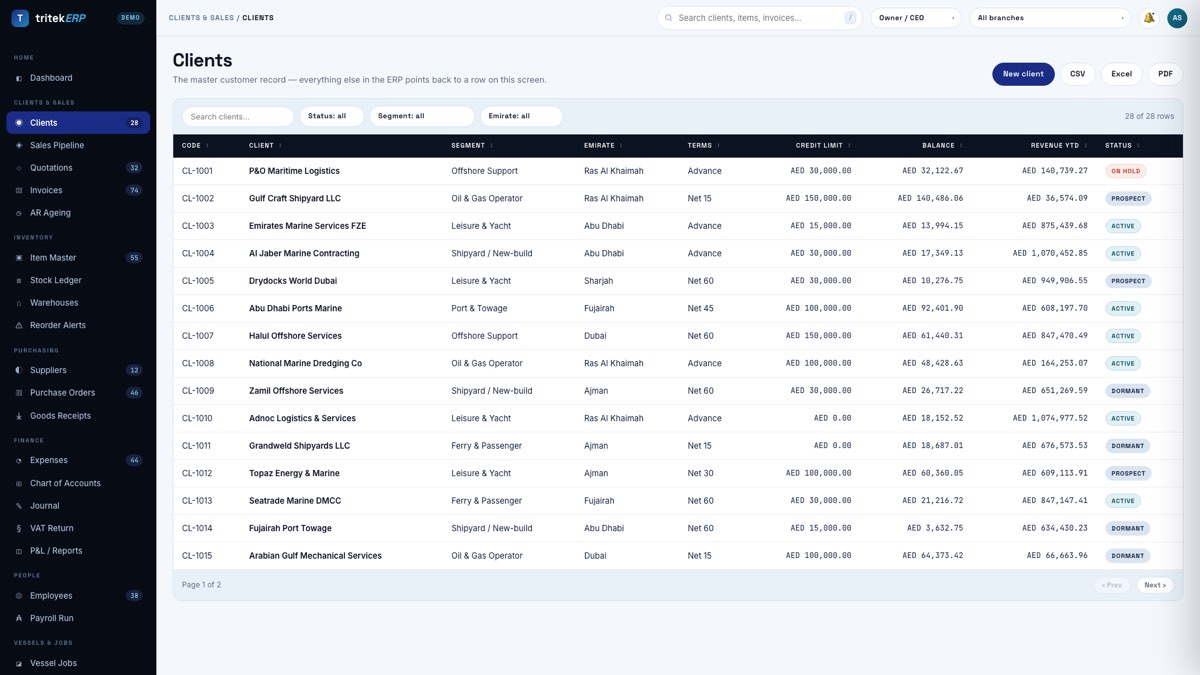
02
Clients
Clients & Sales
The master customer record every other screen points back to — vessel operators, shipyards and offshore contractors, each with credit limit, terms, balance and revenue to date.
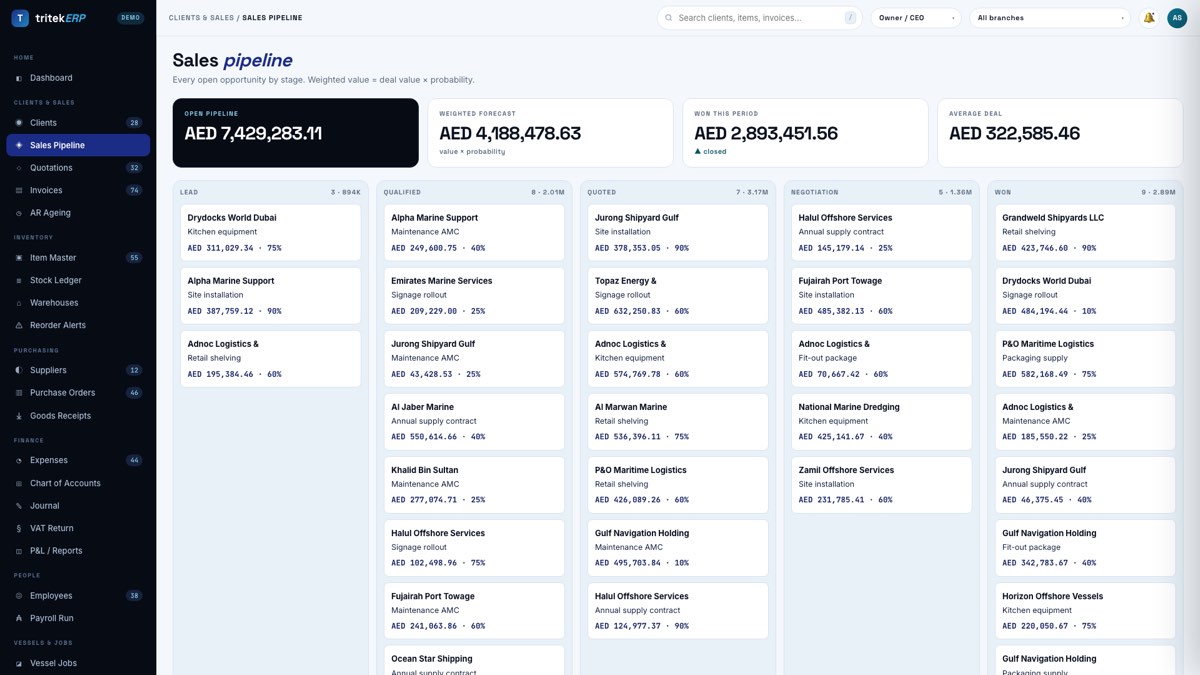
03
Sales pipeline
Clients & Sales
Enquiries from lead to won, weighted by stage. The forecast is calculated from the stage rather than typed in by whoever is most optimistic that week.
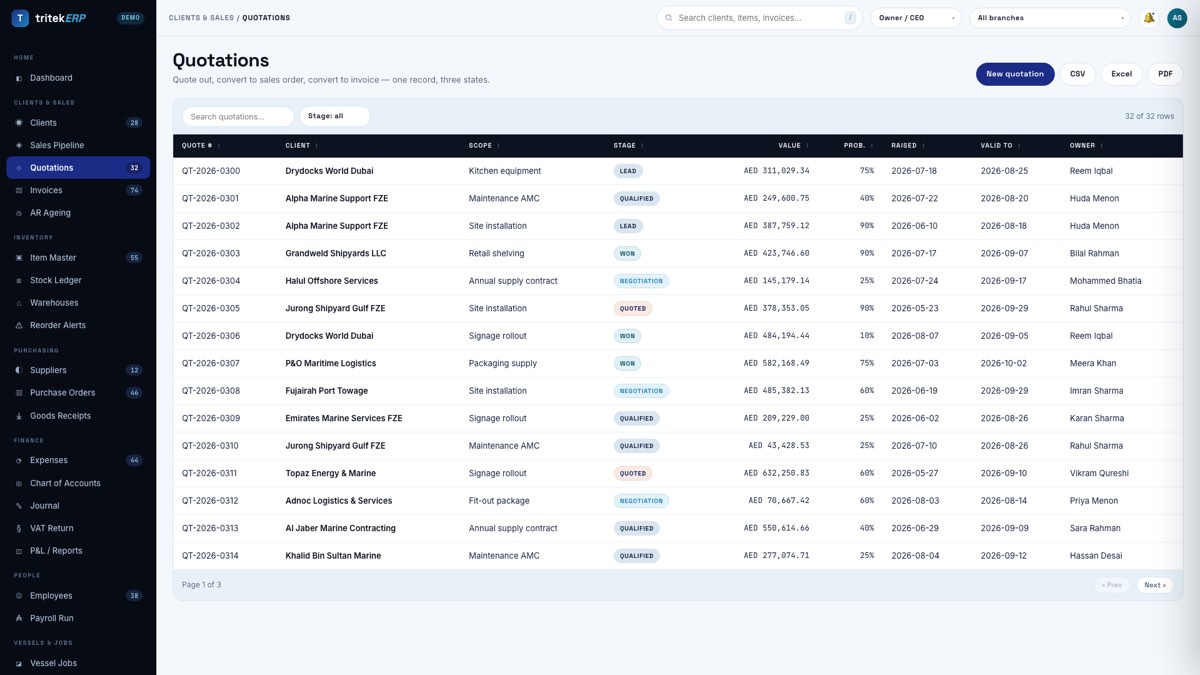
04
Quotations
Clients & Sales
Quotes built from the item master, so the price quoted is the price in the system. A won quote converts into a job and an order without anyone retyping the lines.
05
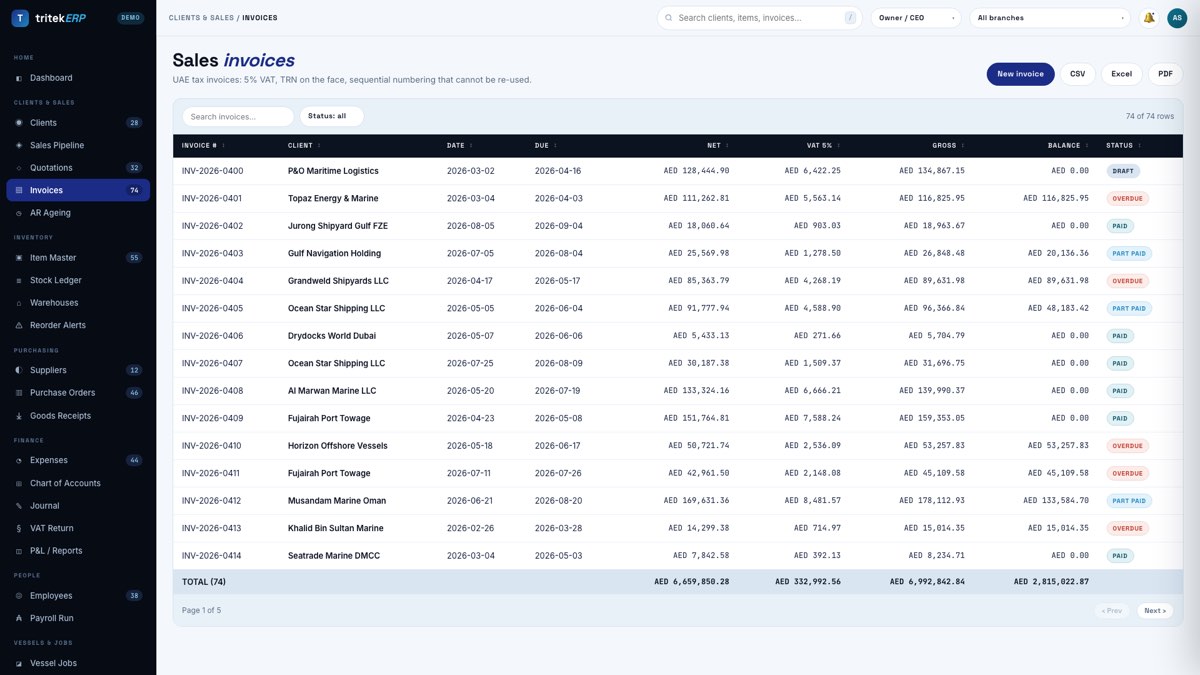
Invoices
Clients & Sales
VAT is calculated per line and then summed, which is the order the Federal Tax Authority expects. An issued invoice cannot be edited, only credited, and the number sequence has no gaps.
06
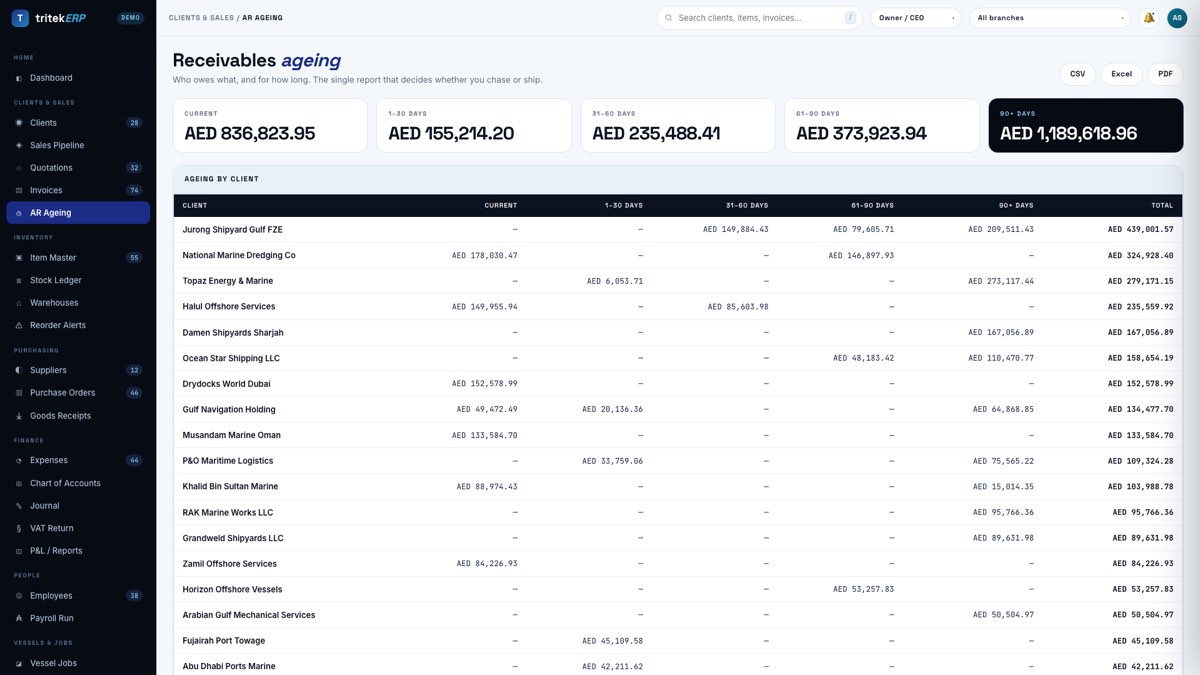
AR ageing
Clients & Sales
Who owes you, how much and how late, in the order you should be chasing them.
07
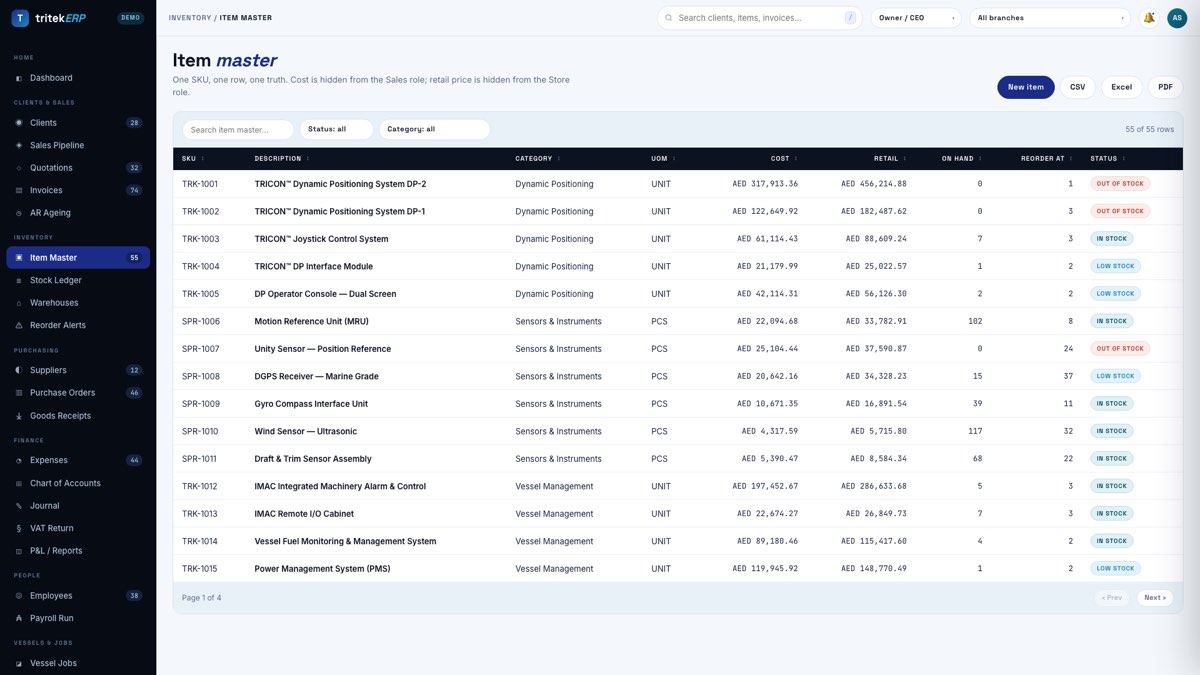
Item master
Inventory
The full catalogue: the TRICON dynamic-positioning line, IMAC machinery alarm systems, propulsion control, LV switchgear and the OEM spares behind them. One SKU, one row.
08
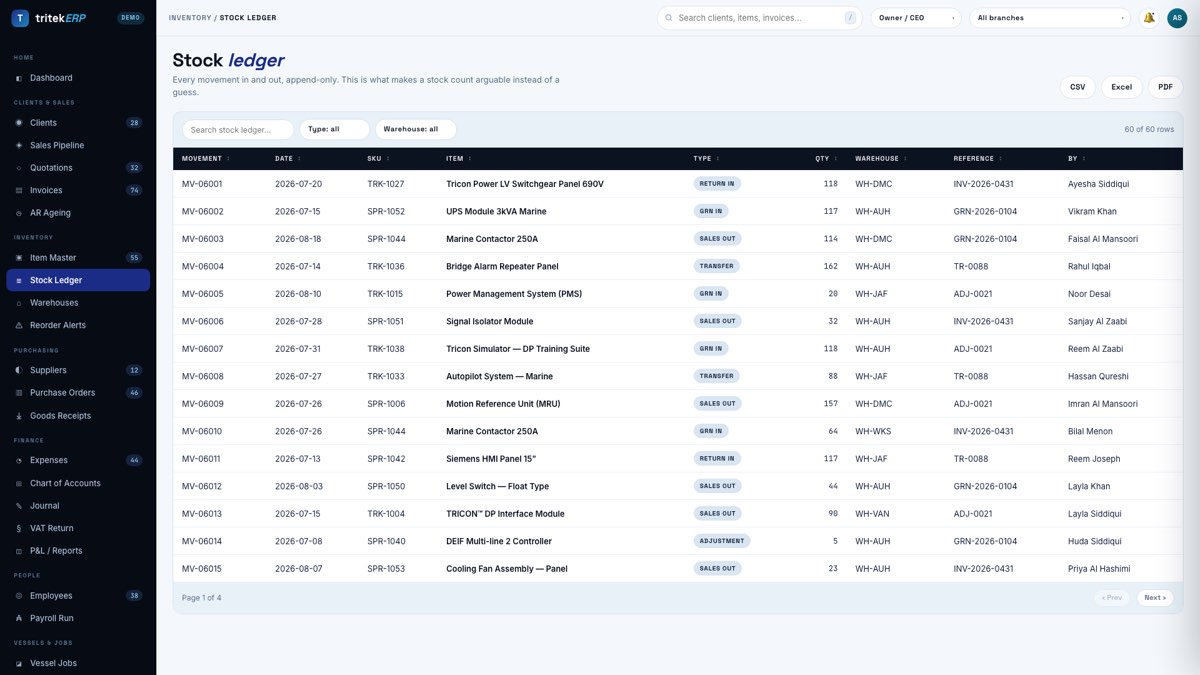
Stock ledger
Inventory
Every movement in and out with a running balance. Stock is an append-only ledger rather than an editable quantity column, so any figure traces back to the document that caused it.
09
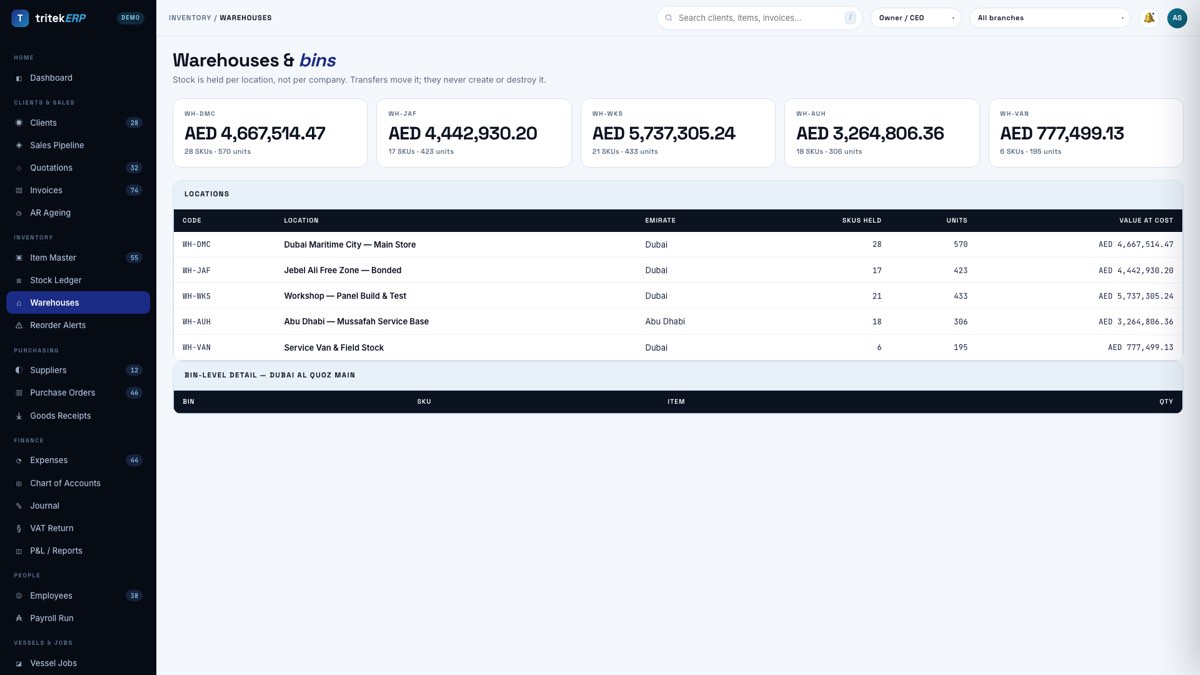
Warehouses
Inventory
Dubai Maritime City, the JAFZA bonded store, the panel workshop, Mussafah and van stock. Bonded and duty-paid stock are held apart, because customs treats them differently.
10
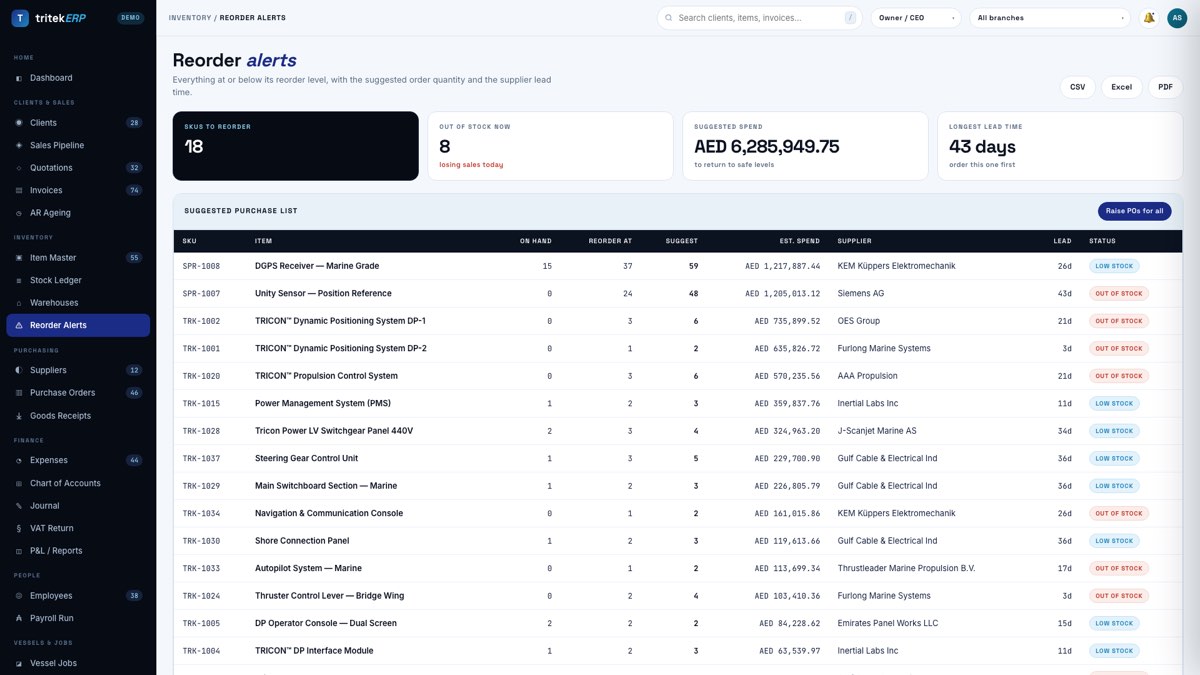
Reorder alerts
Inventory
What has fallen below minimum and what is already on order against it. Serialised equipment and consumable spares reorder on different policies.
11
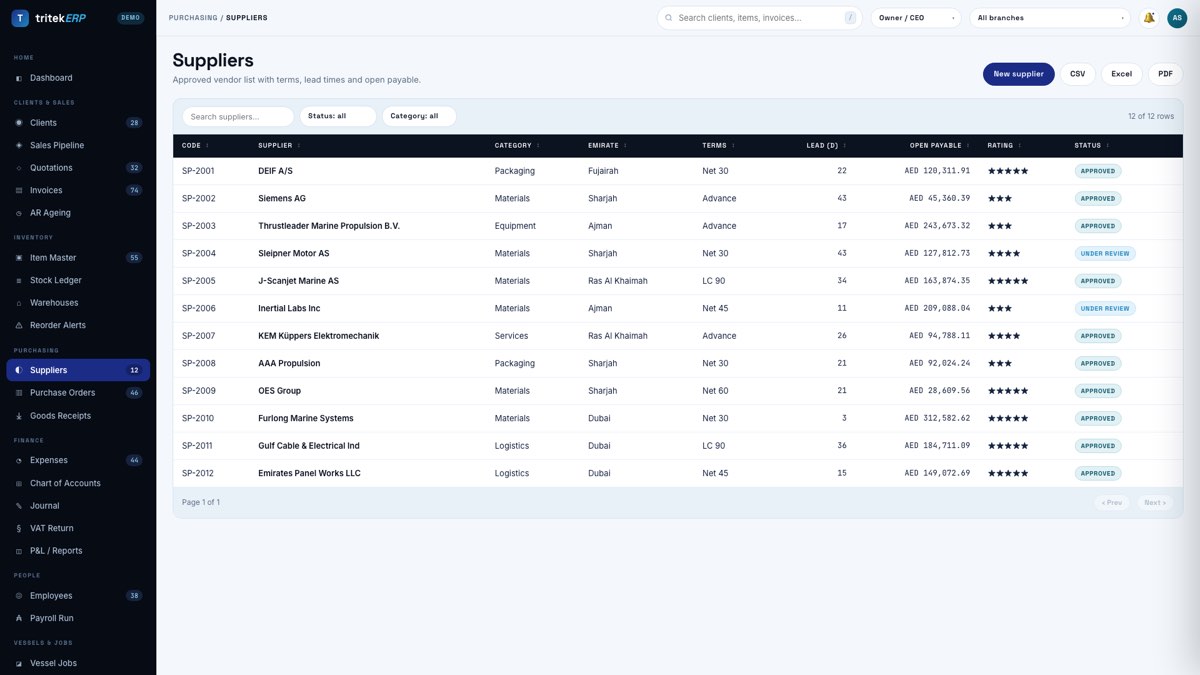
Suppliers
Purchasing
OEM principals with their lead times, currencies and terms. Lead time on the supplier record is what makes a reorder suggestion honest rather than a guess.
12
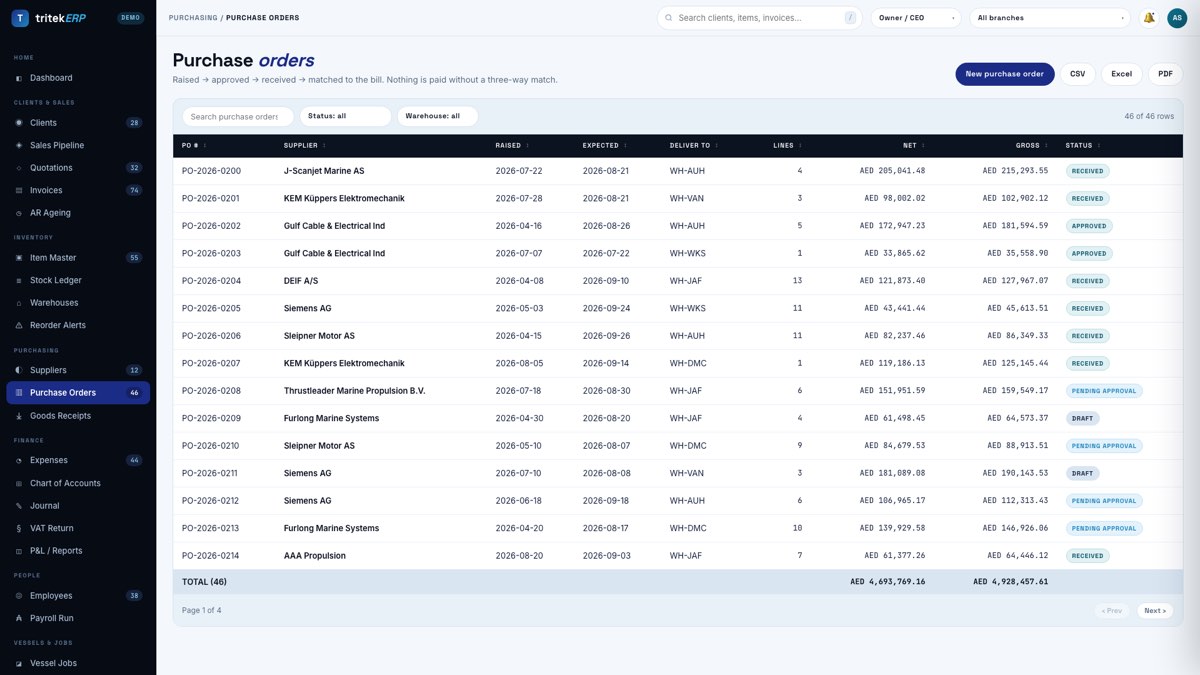
Purchase orders
Purchasing
Raised against a supplier and a vessel job, so committed cost lands on the job when you commit it — not weeks later when the invoice arrives.
13
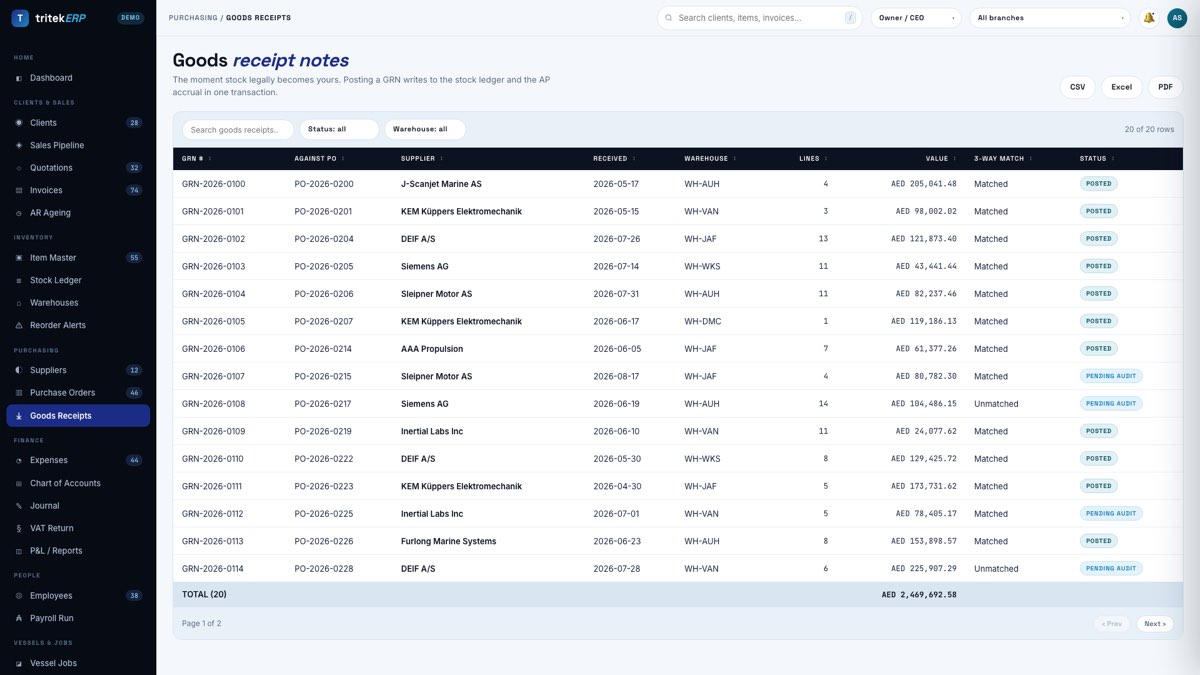
Goods receipts
Purchasing
The three-way match: what was ordered, what arrived, what you were billed. Anything that disagrees is held rather than posted quietly.
14
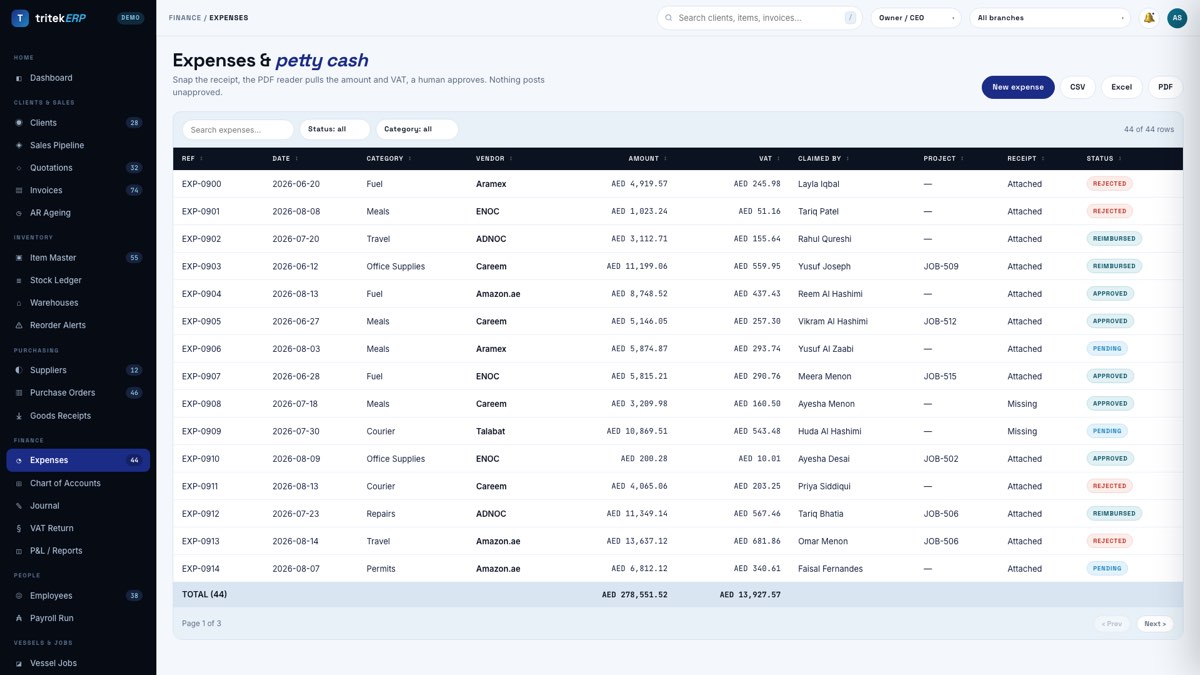
Expenses
Finance
Engineer expenses, travel and offshore allowances coded to a job and a GL account at entry. A costing screen fed by only some of your costs is confidently wrong.
15
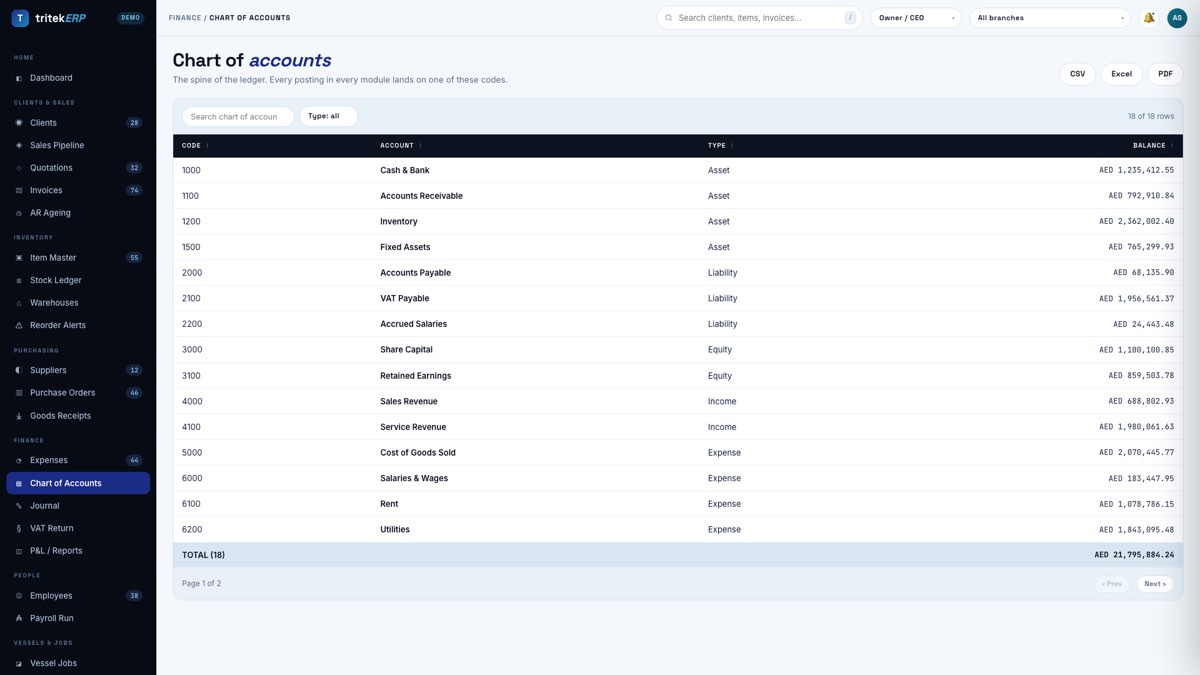
Chart of accounts
Finance
The account structure everything posts into, with branch and job as separate dimensions, so one chart serves every reporting cut you will be asked for.
16
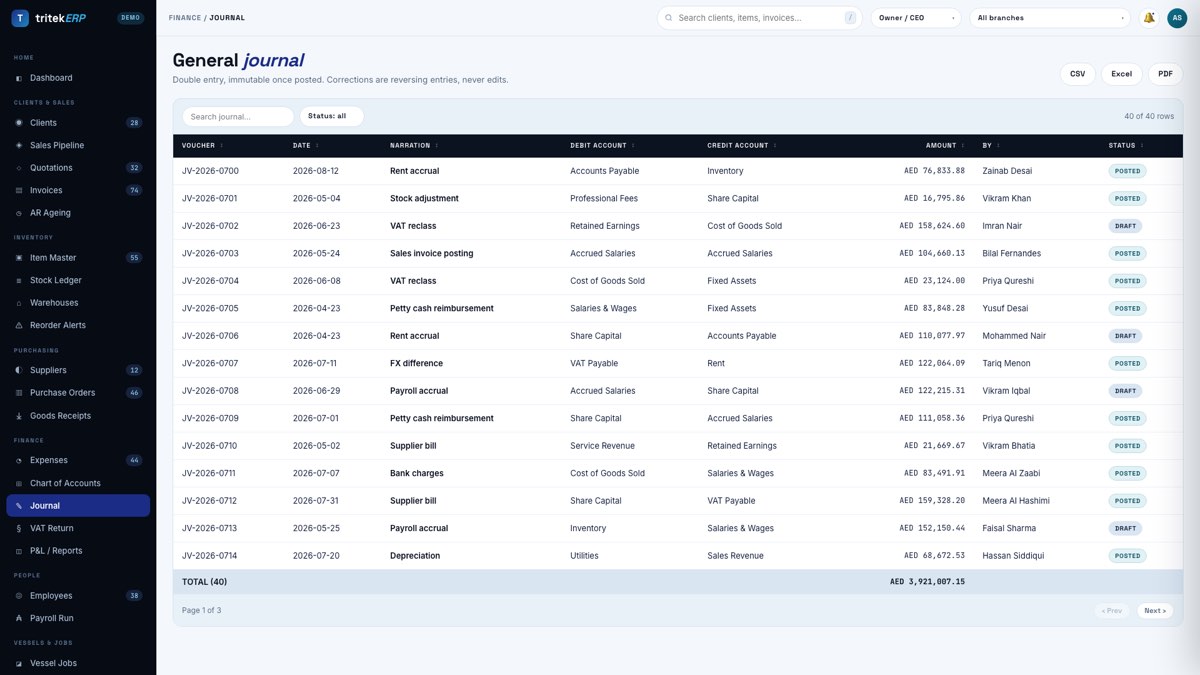
Journal
Finance
Double entry in the open. Every document releases into balanced journal lines and nothing reaches the ledger by another path.
17
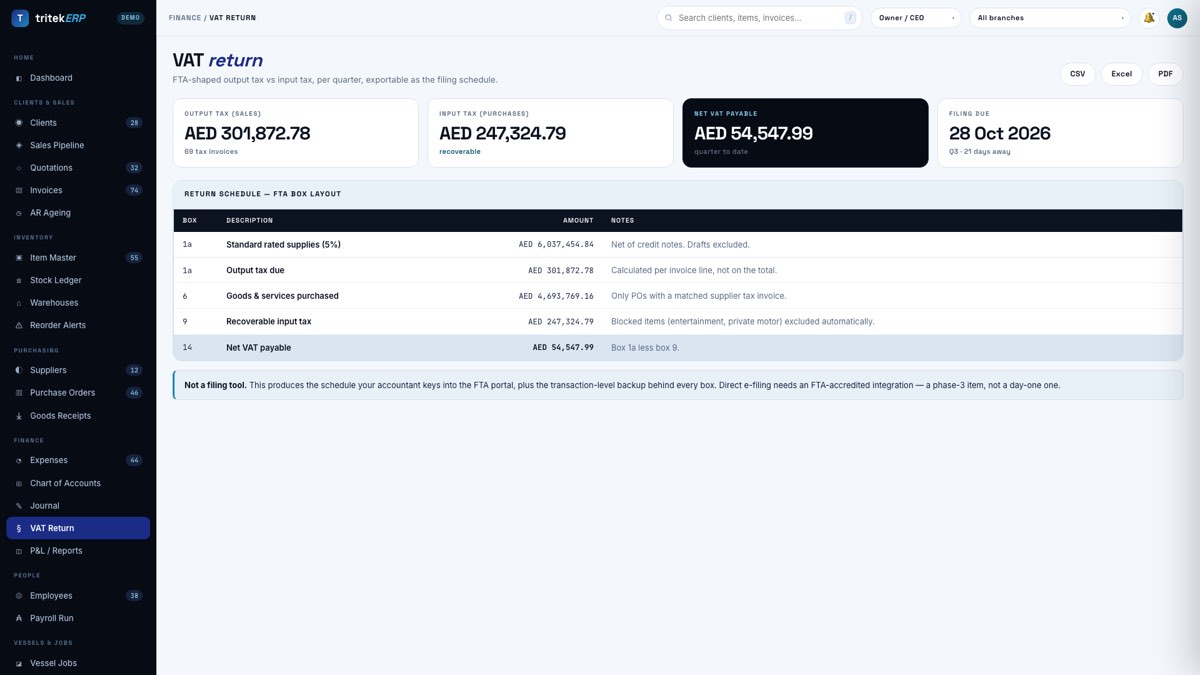
VAT return
Finance
The VAT working box by box, each figure drilling back to the invoices behind it — which is what you need if the return is ever questioned.
18
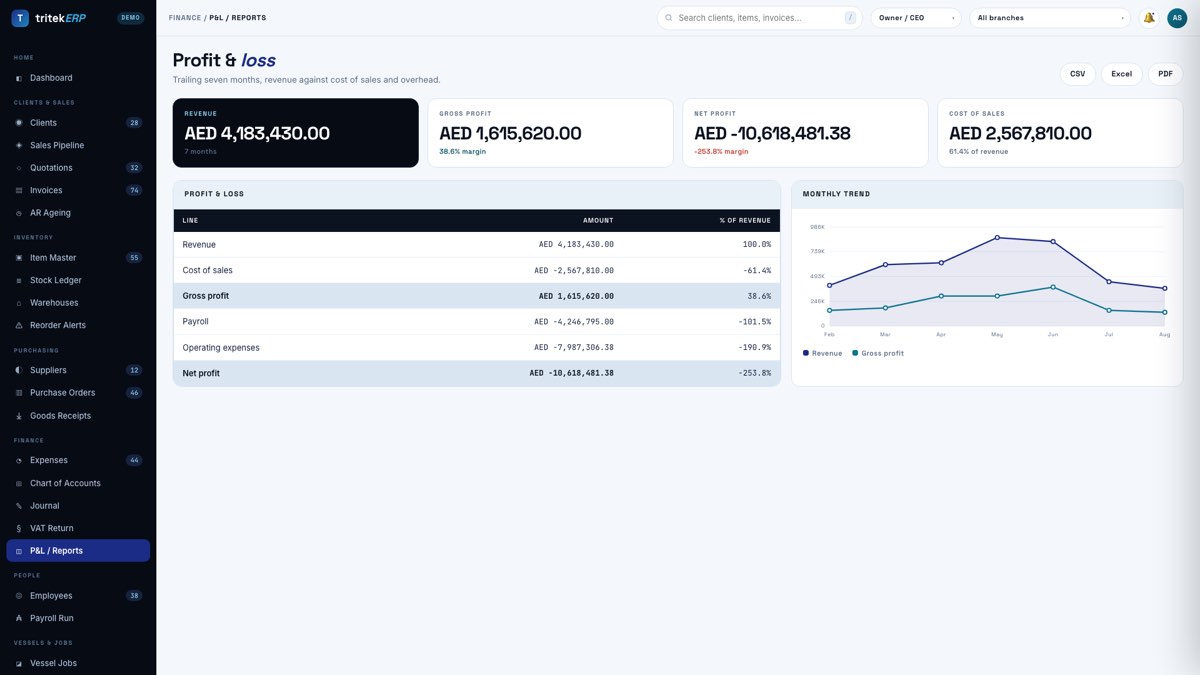
Profit & loss
Finance
Generated from the ledger rather than assembled in a spreadsheet, comparative against the prior period, every line drilling to source.
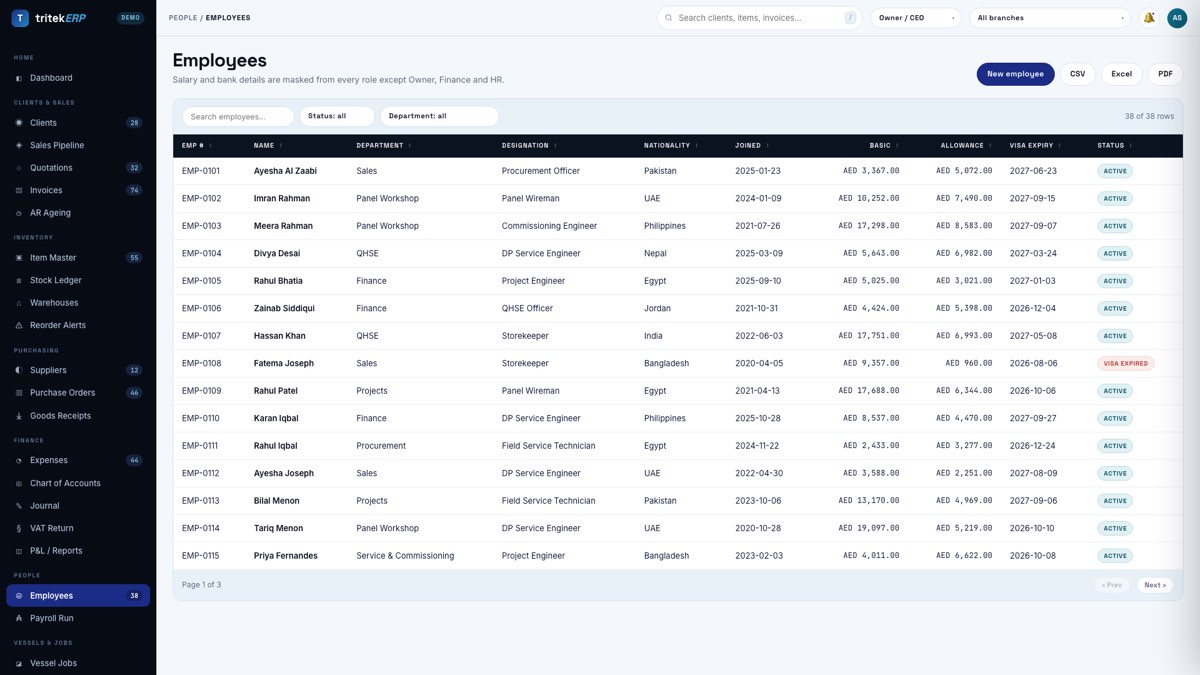
19
Employees
People
Staff with trade certifications and document expiry dates. For offshore work this is commercial: an engineer without a current certificate is turned away at the gangway.
20
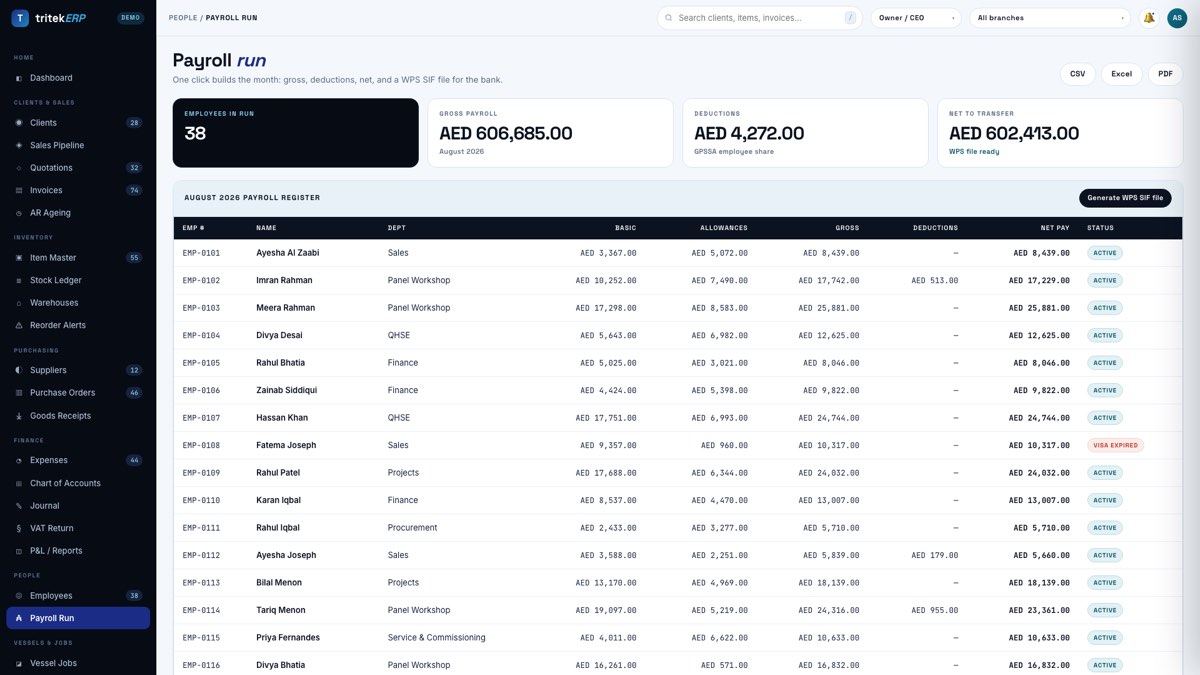
Payroll run
People
Payslips and a WPS-compliant SIF file for the bank, generated from the same records that feed the ledger, so payroll cost and GL never diverge.
21
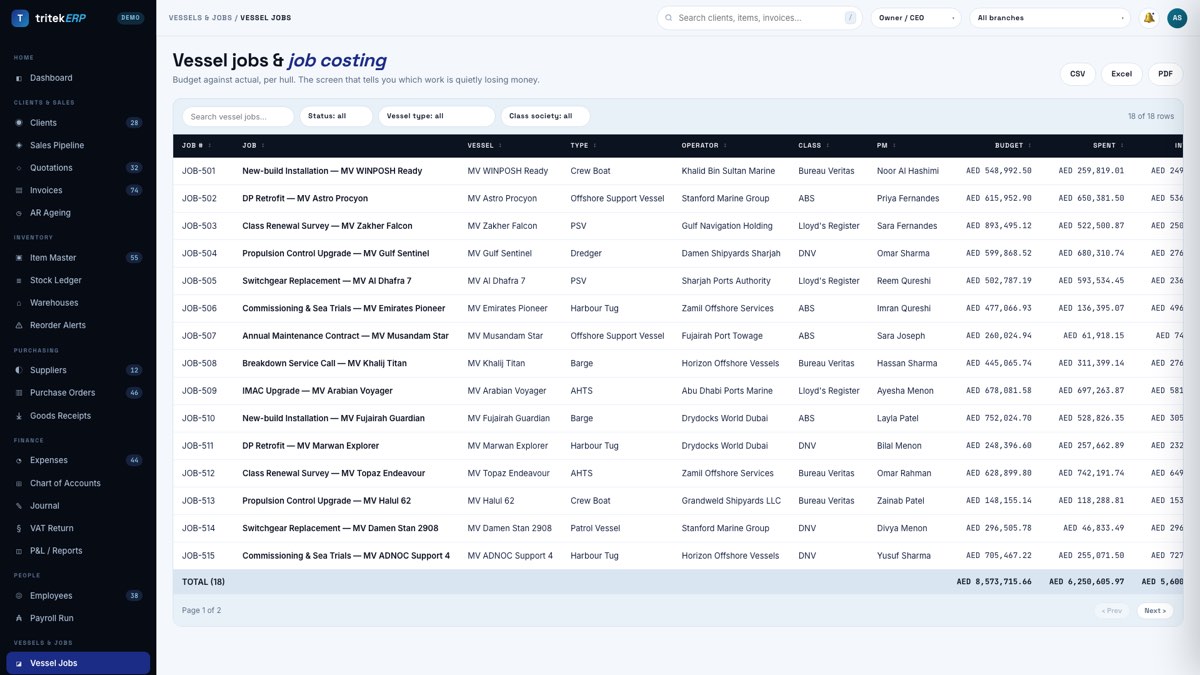
Vessel jobs
Vessels & Jobs
Every job against a named hull with its IMO number, hull type and class society. Budget, committed, actual and invoiced, so you can see which work is quietly losing money.
22
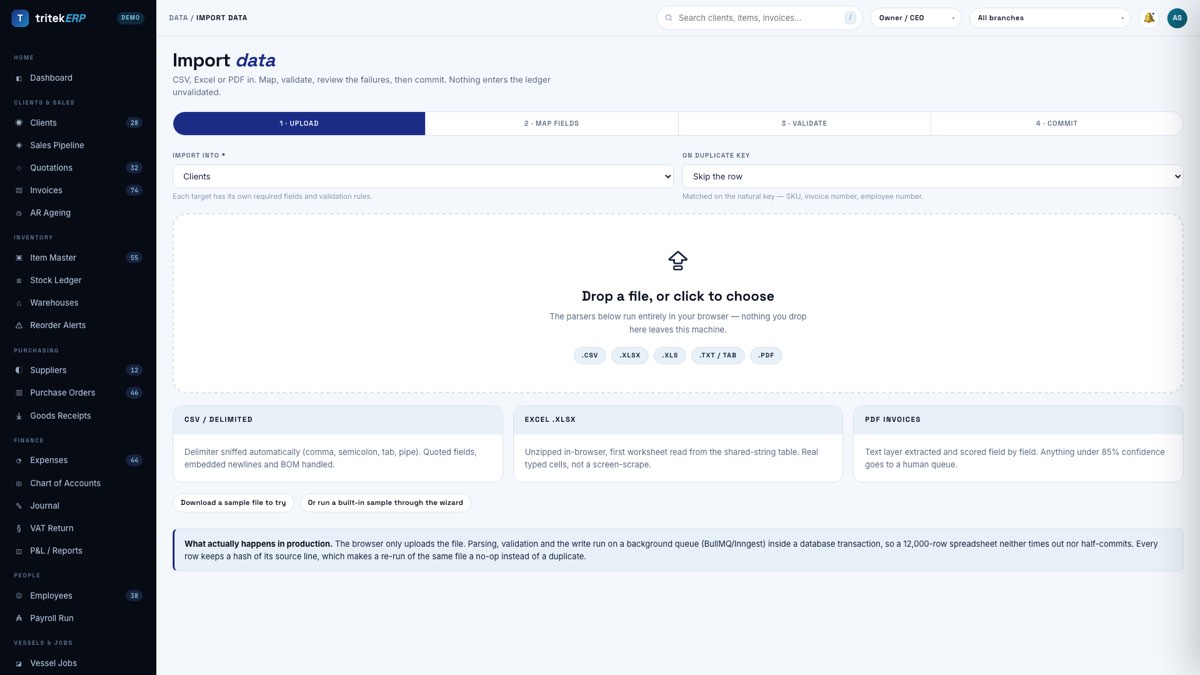
Import wizard
Data In & Out
One import engine for the whole system. Drop a CSV, Excel file or PDF; it sniffs the delimiter, maps columns and validates every row before anything is written. The commit is all-or-nothing and any batch can be rolled back.
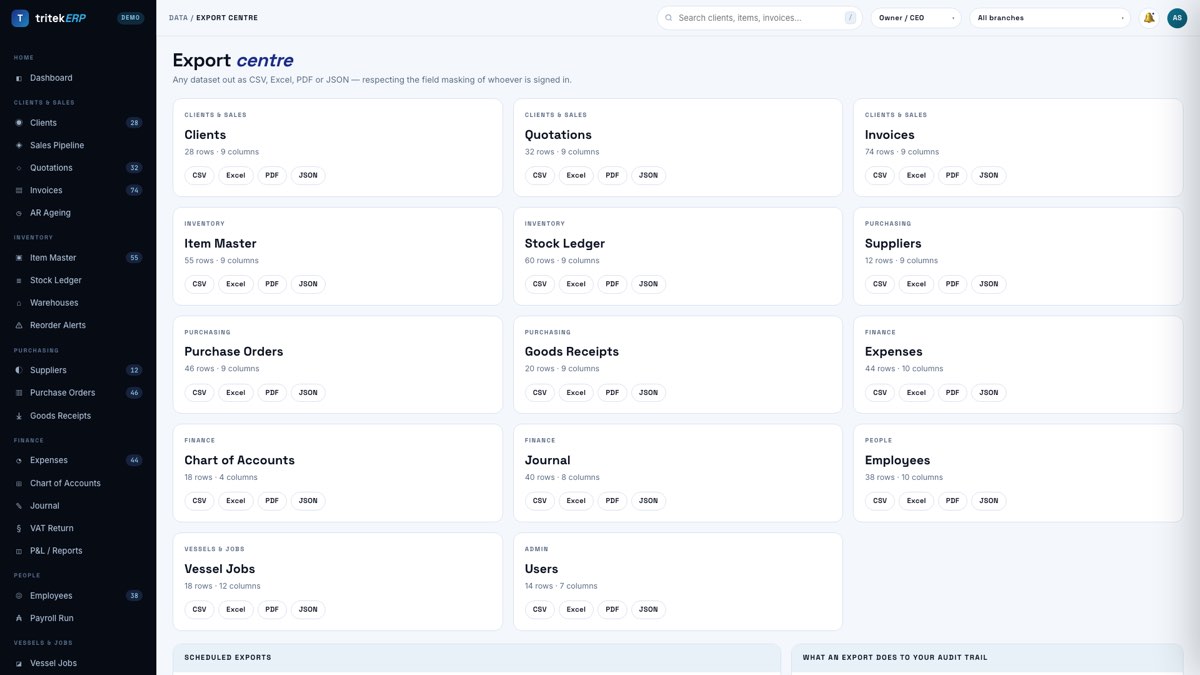
23
Export centre
Data In & Out
Every screen exports to CSV, Excel, PDF or JSON. Exports respect permissions, not just the screen: a user who cannot see cost gets no cost column in their spreadsheet.
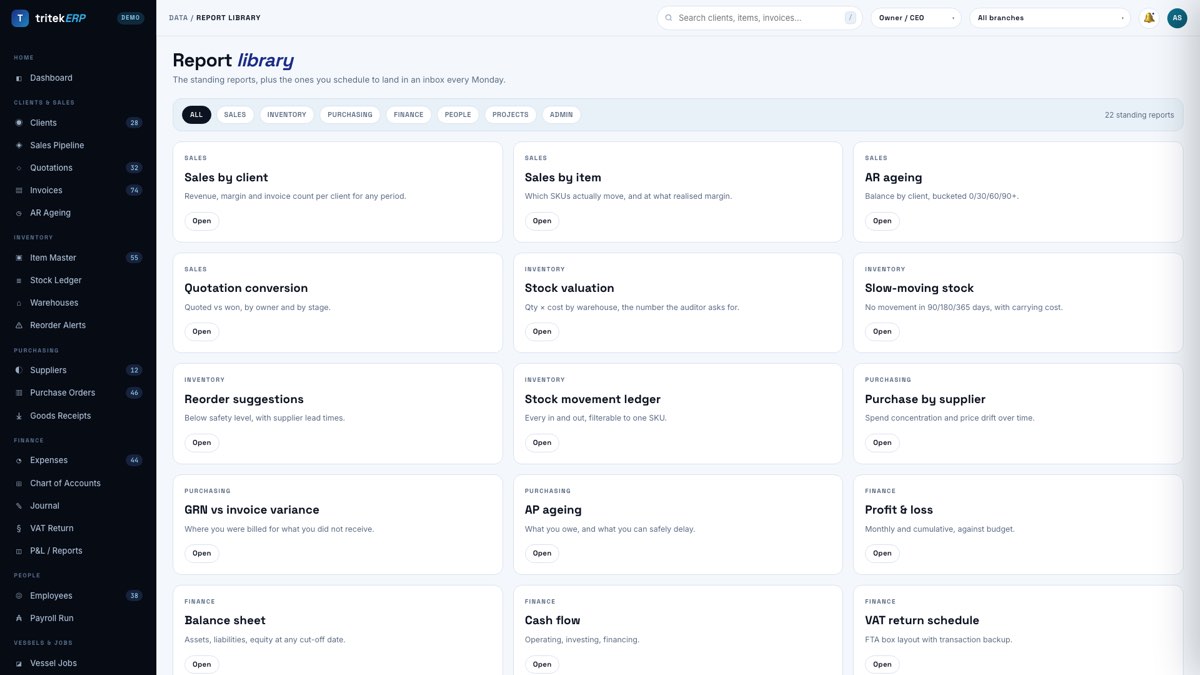
24
Report library
Data In & Out
Saved views with your own columns, filters and totals, which can then be scheduled by email without anyone remembering to run them.
25
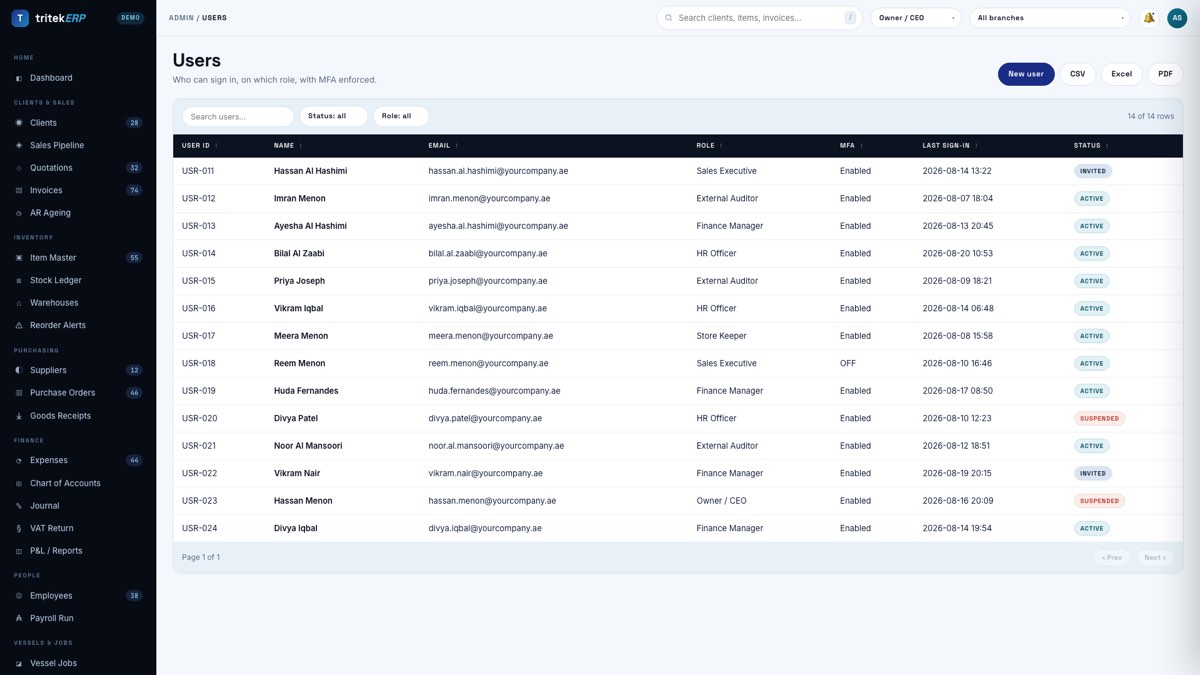
Users
Admin & Security
Users, roles and default branch. Sign-in through Google Workspace, so disabling one account removes ERP access at the same moment.
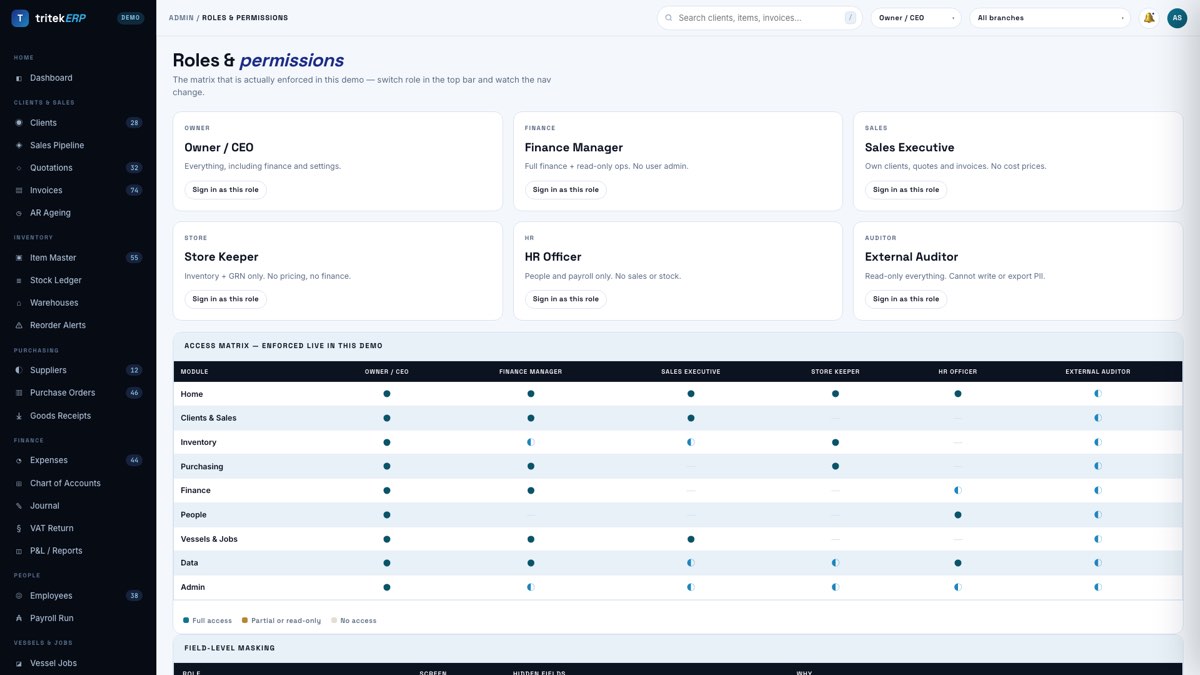
26
Roles & permissions
Admin & Security
Six roles that genuinely change what you can see. Permissions are enforced on the data, so a hidden column is absent from the query rather than merely invisible.
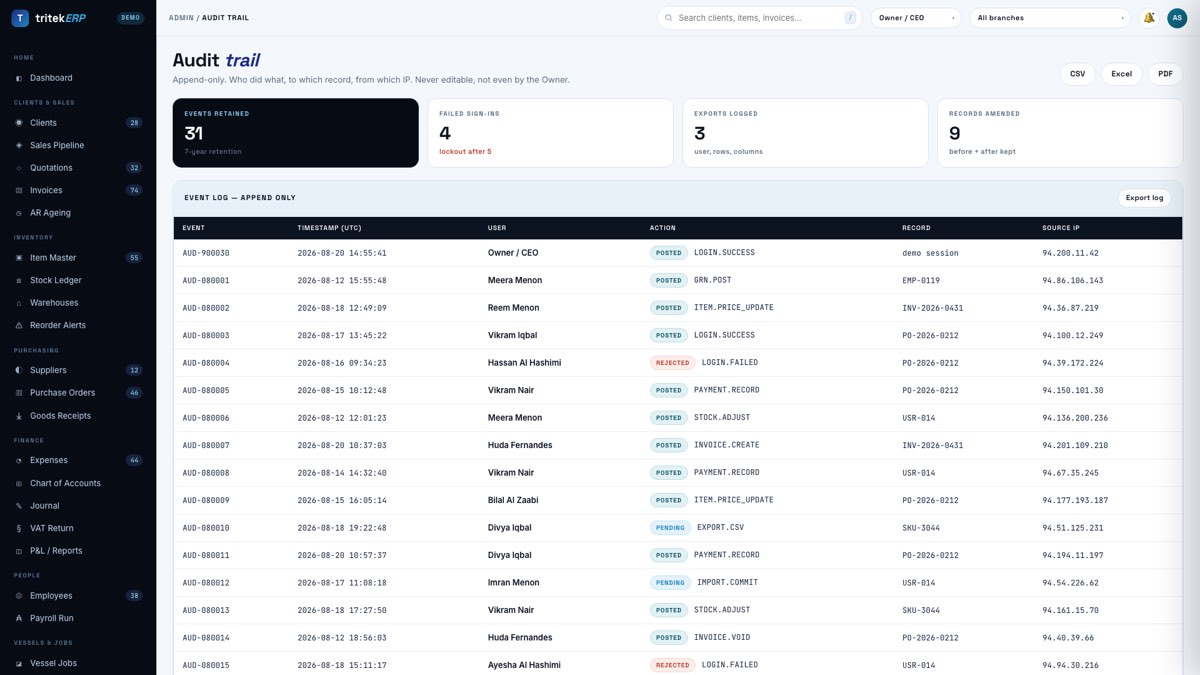
27
Audit trail
Admin & Security
Who changed what, when, and the value before. Append-only and not purgeable — the first thing an auditor asks for and the last thing most home-grown systems can produce.
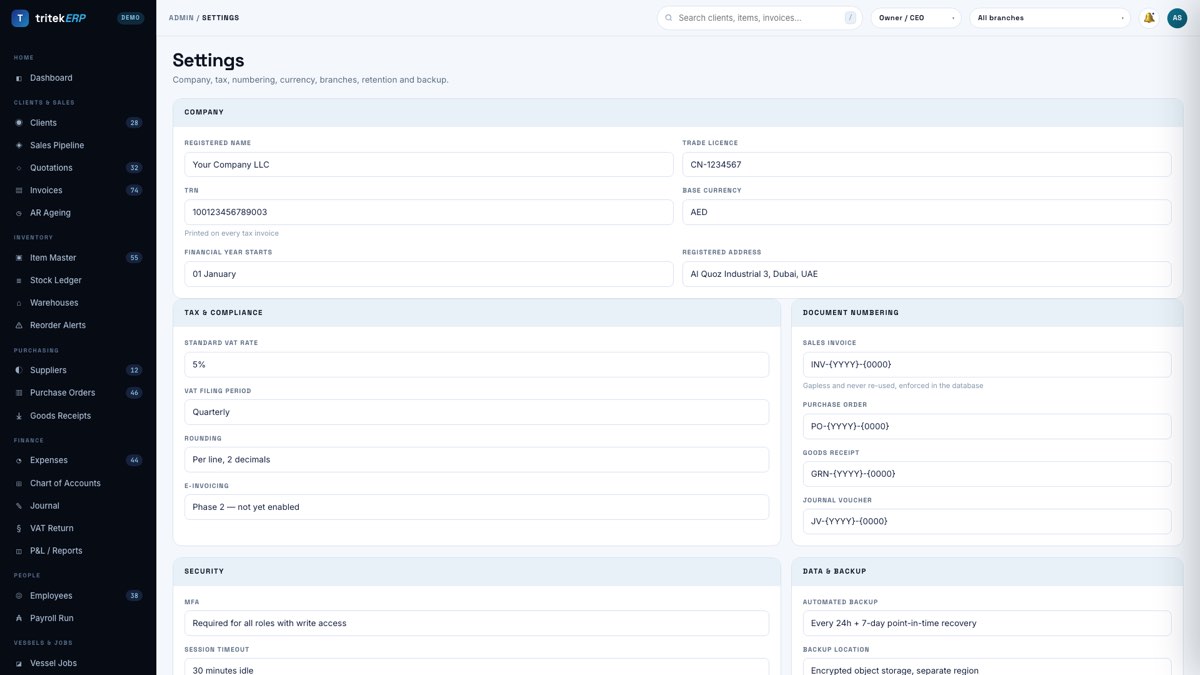
28
Settings
Admin & Security
Company details, tax registration, financial year, branches, numbering formats and document templates. Set once, inherited by every document.
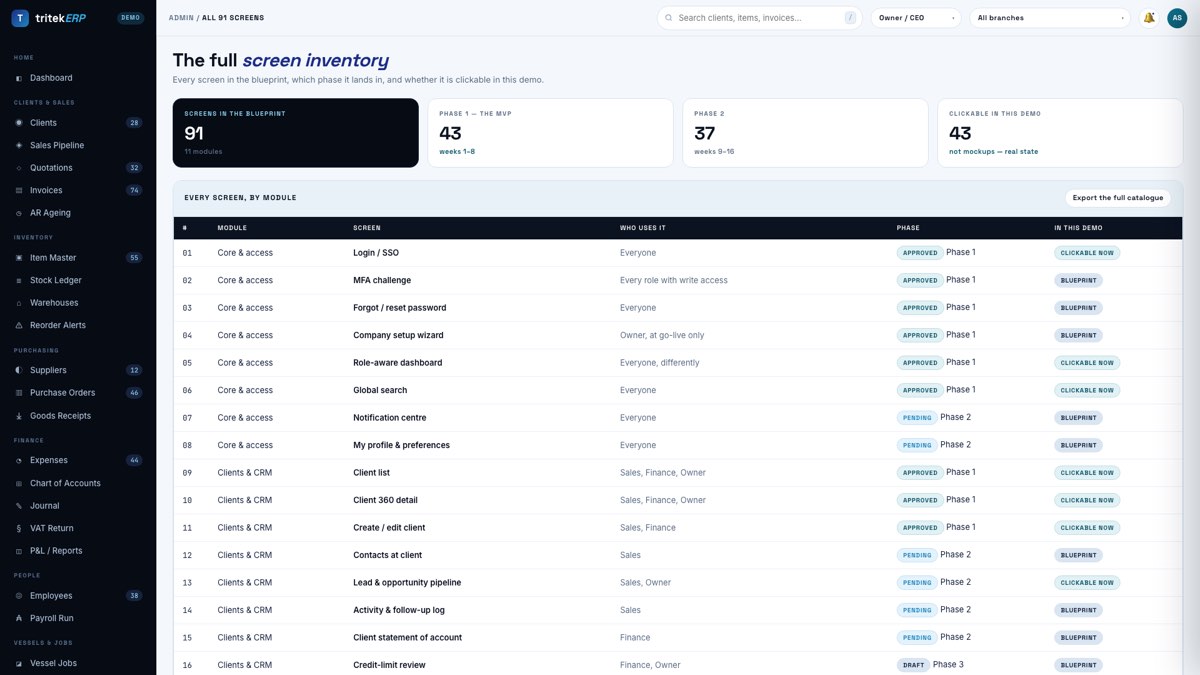
29
The full catalogue
Admin & Security
All 91 screens tagged by build phase, generated from the same catalogue file that drives this document and the demo.
5 · The screen catalogue
Every screen in the system, in build order within its module. For each one: who uses it, what data
is on it, what they can do there, and the operational reason it exists. The last line is the one worth reading —
it is where the design decisions are, and where a generic ERP would get it wrong.
Phase 1 — weeks 1–8, 43 screensPhase 2 — weeks 9–16, 37 screensPhase 3 — after go-live, 11 screensClickable in the demo today — 43 screens
Core & access 8 screens
01
Login / SSO
Phase 1Live in demo
Who uses it
Everyone
On the screen
Email, password, SSO button, tenant selector, language toggle
Actions
Sign in · SSO · reset password
Why it matters
The only screen every employee touches daily. Wire up Google Workspace SSO early: when someone leaves, you disable one account and they lose the ERP too, instead of hoping a leaver checklist gets followed.
Enforce it per role rather than per user. Allow individual exemptions and within a year the exemption list is longer than the enforced list.
03
Forgot / reset password
Phase 1
Who uses it
Everyone
On the screen
Email field, one-time token, new password with breach-list check
Actions
Request link · set new password
Why it matters
Rate-limit this and never reveal whether an address exists. Account enumeration on the reset screen is how most targeted attacks begin.
04
Company setup wizard
Phase 1
Who uses it
Owner, at go-live only
On the screen
Legal name, trade licence, TRN, base currency, financial year start, branches, logo, document number formats
Actions
Complete setup · edit later in Settings
Why it matters
Runs once but writes the settings that are most painful to change afterwards — the financial-year start and the invoice number format above all. Get an accountant to confirm both before you click finish.
Each role gets its own tiles. A storekeeper who opens on cash-flow figures learns to ignore the dashboard within a week; give them stock levels and pending receipts and they will actually use it.
06
Global search
Phase 1Live in demo
Who uses it
Everyone
On the screen
Cross-entity results by code, name or reference, grouped by type
Actions
Search · open record · jump to screen
Why it matters
Results are filtered by permission, so a rep searching a client they do not own finds nothing. Search is the single most common place where home-grown systems leak data they thought was hidden.
07
Notification centre
Phase 2
Who uses it
Everyone
On the screen
Rule-generated alerts grouped by module, read state, snooze
Actions
Open source record · mark read · mute rule
Why it matters
These are saved conditions with a schedule and a recipient, not reports someone has to remember to run. The difference is whether problems find you or you have to go looking.
08
My profile & preferences
Phase 2
Who uses it
Everyone
On the screen
Name, contact, language, date and number format, MFA devices, active sessions
Actions
Update details · enrol MFA · revoke a session
Why it matters
The active-session list lets someone kill a lost phone themselves at 11pm instead of calling you.
Clients & CRM 8 screens
09
Client list
Phase 1Live in demo
Who uses it
Sales, Finance, Owner
On the screen
Code, name, segment, emirate, payment terms, credit limit, open balance, revenue YTD, status
Actions
Search · filter · sort · export · create · open
Why it matters
The open balance is derived from the ledger, never typed. The moment someone can edit a balance directly, every reconciliation becomes a matter of opinion.
10
Client 360 detail
Phase 1Live in demo
Who uses it
Sales, Finance, Owner
On the screen
Master record plus invoices, quotations, contacts, activity log, documents, statement
Duplicate detection on name and TRN at the point of entry. Two records for one customer silently splits their credit limit and hides your real exposure.
Model people separately from companies. People move between employers; if the contact is a column on the client record, you lose the relationship when they do.
13
Lead & opportunity pipeline
Phase 2Live in demo
Who uses it
Sales, Owner
On the screen
Kanban by stage, deal value, probability, owner, next action date, age in stage
Actions
Drag between stages · open · convert to quote
Why it matters
Weighted forecast is value multiplied by probability. Without a probability field a pipeline is a wish list, and every forecast built on it is fiction.
14
Activity & follow-up log
Phase 2
Who uses it
Sales
On the screen
Calls, meetings, emails, notes, next action date and owner
Actions
Log activity · set follow-up · complete
Why it matters
The next-action date is the only field that earns its keep. Everything else on this screen is a diary; that one field is a system.
Emailing this automatically on the first of every month collects more cash than any chase call, because it arrives before the customer has decided who to pay.
16
Credit-limit review
Phase 3
Who uses it
Finance, Owner
On the screen
Current limit, live exposure, payment history, average days to pay, suggested limit
Actions
Approve · adjust · place on hold
Why it matters
Set limits from actual payment behaviour, not from how much the customer says they intend to buy.
Track the validity date and expire quotes automatically. Live quotes at last year's prices are a slow leak in your margin.
18
Quotation builder
Phase 1
Who uses it
Sales
On the screen
Client, line items pulled from the item master, quantity, rate, discount, VAT, terms, validity, notes
Actions
Add lines · apply discount · preview PDF · send · convert to order
Why it matters
Build lines from the item master rather than free text. Free-typed lines are how you end up quoting a product you no longer stock at a price you no longer honour.
19
Sales order list
Phase 1
Who uses it
Sales, Warehouse
On the screen
Order number, client, order date, promised date, value, fulfilment status
Actions
Filter · export · open · release to warehouse
Why it matters
The order is the commitment; the invoice is the consequence. Keeping them as separate records is what lets you promise stock without pretending you have billed it.
20
Sales order detail
Phase 1
Who uses it
Sales, Warehouse
On the screen
Header, lines, quantity ordered vs reserved vs delivered, back-order position
Actions
Reserve stock · part-deliver · amend · cancel
Why it matters
Reserving stock at order confirmation is what stops two salespeople selling the same last unit on the same afternoon.
21
Delivery note / dispatch
Phase 2
Who uses it
Warehouse, Driver
On the screen
Order reference, items, quantities picked, vehicle, driver, customer signature
Actions
Pick · print · capture signature · post
Why it matters
Posting the delivery note is what moves stock out, not the invoice. Tie stock movement to the invoice and your inventory is wrong for every unbilled delivery.
22
Invoice list
Phase 1Live in demo
Who uses it
Finance, Sales, Owner
On the screen
Invoice number, client, date, due date, net, VAT, gross, amount paid, balance, status
Status is derived from receipts, not chosen from a dropdown. A human-set "Paid" flag and a bank statement will disagree eventually, and the flag always loses.
23
Invoice builder (VAT)
Phase 1
Who uses it
Finance, Sales
On the screen
Client and TRN, line items, quantity, rate, discount, per-line VAT, totals, PO reference, payment terms
VAT is computed per line and then summed, never applied to the invoice total. The two methods differ by fils on every invoice, and those fils are exactly what a tax audit reconciles.
24
Credit note
Phase 2
Who uses it
Finance
On the screen
Original invoice reference, reason code, lines credited, VAT reversal
Actions
Raise · link to invoice · post · email
Why it matters
The only legitimate way to correct a posted invoice. If your system lets anyone edit a posted invoice instead, you do not have an audit trail, you have a rumour.
25
Receipts & payment collection
Phase 1
Who uses it
Finance
On the screen
Client, amount, date, method, bank reference, invoices allocated against
Actions
Record receipt · allocate across invoices · part-allocate · export
Why it matters
One receipt frequently settles several invoices, and one invoice is often settled by several receipts. Model that as an allocation table on day one; retrofitting it later is a migration nobody enjoys.
26
AR ageing
Phase 1Live in demo
Who uses it
Finance, Owner
On the screen
Client, balance bucketed current / 1–30 / 31–60 / 61–90 / 90+, total due
Actions
Filter · drill to invoice · export PDF · email chase list
Why it matters
Anything sitting in the 90+ column is, statistically, a write-off waiting to be admitted. Read this weekly and you find out months earlier than your bank does.
Inventory 11 screens
27
Item master list
Phase 1Live in demo
Who uses it
Warehouse, Purchasing, Sales, Finance
On the screen
SKU, description, category, unit of measure, cost, retail price, quantity on hand, reorder level, status
Actions
Search · filter · sort · export · create · open
Why it matters
One SKU, one row, one truth. Cost price is hidden from Sales and retail price from the warehouse — enforced in the query, so the masking survives an export.
28
Item detail — stock by location
Phase 1Live in demo
Who uses it
Warehouse, Purchasing
On the screen
Full item record, quantity per warehouse and bin, reserved quantity, recent movements, default supplier, batch and expiry
Actions
Edit · transfer · adjust · view ledger
Why it matters
Quantity belongs to a location, never to the item. The item's "on hand" figure is a sum of its locations, which is why a transfer can never accidentally create or destroy stock.
29
Create / edit item
Phase 1Live in demo
Who uses it
Purchasing, Warehouse
On the screen
Description, barcode, category, unit of measure, cost, price, reorder level, supplier, tracking options
Actions
Save · duplicate · deactivate
Why it matters
Changing the unit of measure on an item that already has movements is forbidden; you clone the item instead. Allowing it silently rewrites the history of every past transaction.
30
Categories, UoM & attributes
Phase 2
Who uses it
Purchasing, Admin
On the screen
Category tree, units of measure and conversions, custom attributes such as size, colour, season
Actions
Add · rename · merge · reorder
Why it matters
Lookups rather than free text. Free-typed categories give you "Raw Material", "raw materials" and "RAW MAT" inside a month, and every report built on them is wrong.
31
Warehouses & bins
Phase 1Live in demo
Who uses it
Warehouse, Owner
On the screen
Location code, name, emirate, SKUs held, total units, value at cost, bin structure
Actions
Add location · define bins · view holdings
Why it matters
Bin-level detail is optional at first but almost impossible to add later, because it requires a full physical count to establish opening positions.
32
Stock ledger
Phase 1Live in demo
Who uses it
Warehouse, Finance, Auditor
On the screen
Movement reference, date, SKU, movement type, signed quantity, warehouse, source document, user
Actions
Filter by SKU, type, date or location · export
Why it matters
Append-only: no updates, no deletions. This is the table an auditor reads, and it is the reason a stock count becomes an argument you can win rather than a guess.
33
Stock transfer
Phase 2
Who uses it
Warehouse
On the screen
From location, to location, items, quantities, in-transit status, receiving confirmation
Actions
Raise · dispatch · receive · cancel
Why it matters
Model transfers with an in-transit state. Without one, stock vanishes from the books for however long the van is on the road, and someone will reorder it.
34
Stock adjustment / write-off
Phase 2
Who uses it
Warehouse supervisor, Finance
On the screen
Item, quantity, reason code, value impact, approver
Actions
Raise · approve · post
Why it matters
Every adjustment needs a mandatory reason code and a second approver. Unapproved adjustments are the single easiest way to hide theft in any inventory system.
35
Physical stock count
Phase 2
Who uses it
Warehouse, Auditor
On the screen
Count sheet by bin, system quantity, counted quantity, variance, value of variance
Actions
Freeze · count · recount variances · post adjustment
Why it matters
Freeze movements for the counted locations while counting. Counting a live warehouse produces a variance report that measures nothing but the traffic through the door.
36
Reorder alerts
Phase 1Live in demo
Who uses it
Purchasing, Owner
On the screen
SKU, on hand, reorder level, suggested quantity, estimated spend, supplier, lead time
Actions
Filter · raise POs in bulk · export
Why it matters
Sort by lead time, not by shortfall. The item that takes 45 days to arrive needs ordering before the one you can collect from Al Quoz this afternoon.
37
Batch / serial & expiry
Phase 3
Who uses it
Warehouse, Quality
On the screen
Batch or serial number, quantity, manufacture and expiry dates, supplier, linked movements
Actions
Assign · trace forward and back · quarantine
Why it matters
Only build this if you genuinely need a recall trace or you handle perishables. It roughly doubles the complexity of every stock screen, so make it a deliberate decision.
Purchasing 8 screens
38
Supplier list
Phase 1Live in demo
Who uses it
Purchasing, Finance
On the screen
Code, name, category, emirate, payment terms, lead days, open payable, rating, approval status
Actions
Search · filter · export · create · open
Why it matters
Approval status is a control, not a label. A purchase order should be impossible to raise against a supplier who has not been approved.
39
Supplier detail
Phase 1Live in demo
Who uses it
Purchasing, Finance
On the screen
Master record, bank details, trade licence and documents, purchase history, price history, open POs
Actions
Edit · view POs · view price trend · block
Why it matters
The price-history view is the one that pays for itself, because it shows you the supplier who has raised prices 6% a year while nobody was looking.
Separating the request from the order is what puts a budget check between "we want it" and "we have committed to buy it".
41
Purchase order
Phase 1Live in demo
Who uses it
Purchasing
On the screen
PO number, supplier, dates, delivery location, lines, quantity, rate, VAT, totals, approval status
Actions
Raise · approve · send to supplier · amend · close
Why it matters
A purchase order is a promise, not a transaction. It moves no stock and books no cost — which is exactly why an unapproved PO is harmless and an unapproved GRN is not.
42
Goods receipt note
Phase 1Live in demo
Who uses it
Warehouse
On the screen
PO reference, supplier, receipt date, location, lines, quantity received vs ordered, condition, receiver
Actions
Receive in full · part-receive · reject lines · post
Why it matters
The moment stock legally becomes yours. Posting writes the stock movement and the accrual in one transaction — both, or neither, never one of the two.
43
Purchase invoice / bill
Phase 1
Who uses it
Finance
On the screen
Supplier, invoice number, date, lines, VAT, total, linked PO and GRN, match status
Actions
Enter or import from PDF · match · approve · post
Why it matters
This is where PDF extraction earns its place: the supplier already sent you the data, just not in a format you can use.
44
Three-way match exceptions
Phase 2
Who uses it
Finance
On the screen
PO price vs GRN quantity vs bill amount, variance value and percentage, tolerance breach reason
Actions
Investigate · accept within tolerance · reject · escalate
Why it matters
This screen is most of your fraud control in one table. A payment that cannot be raised against an unmatched bill closes off the commonest route to paying for goods nobody received.
45
Supplier payments & AP ageing
Phase 2
Who uses it
Finance, Owner
On the screen
Supplier, bills due, ageing buckets, payment run selection, bank account, remittance advice
Actions
Select for payment · approve · generate transfer file · email remittance
Why it matters
AP ageing is the mirror of AR ageing and it tells you the other half of your cash position: what you can safely delay, and what will cost you a supplier if you do.
Finance 10 screens
46
Chart of accounts
Phase 1Live in demo
Who uses it
Finance, Auditor
On the screen
Account code, name, type, parent, current balance, active flag
Actions
Add · edit · deactivate · export
Why it matters
Have your accountant sign this off before a single transaction is posted. Restructuring a chart of accounts after twelve months of postings is the most expensive avoidable job in the whole project.
47
Journal entries
Phase 2Live in demo
Who uses it
Finance
On the screen
Voucher number, date, narration, debit and credit lines, amount, supporting document, status
Actions
Raise · post · reverse · export
Why it matters
Posted journals are immutable. Corrections are reversing entries, never edits — that single rule is the difference between a ledger and a spreadsheet.
48
Bank accounts
Phase 2
Who uses it
Finance
On the screen
Account name, bank, IBAN, currency, book balance, statement balance, last reconciled date
Actions
Add · import statement · open reconciliation
Why it matters
Showing book balance and statement balance side by side makes an unreconciled account impossible to ignore.
49
Bank reconciliation
Phase 3
Who uses it
Finance
On the screen
Statement lines, suggested matches, unmatched items both ways, reconciled difference
Actions
Auto-match · match manually · create missing entry · finalise
Why it matters
Automate the matching but never the finalisation. The unmatched items are the point of the exercise; a reconciliation that closes itself tells you nothing.
Claim · attach receipt via photo or PDF · approve · reject · reimburse
Why it matters
Photograph the receipt, let the extractor read the amount and VAT, and let a human approve. Nothing posts unapproved, and no claim is accepted without an attachment.
51
VAT return schedule
Phase 2Live in demo
Who uses it
Finance, Accountant
On the screen
Output tax by rate, input tax, blocked items, adjustments, net payable, FTA box layout
Actions
Generate for period · drill to transactions · export schedule
Why it matters
This produces the schedule your accountant keys into the FTA portal, plus the transaction-level backup behind every box. Direct e-filing needs an accredited integration and belongs in a later phase.
52
Trial balance
Phase 2
Who uses it
Finance, Auditor
On the screen
Every account with debit and credit totals and closing balance, for any cut-off date
Actions
Run for date · drill to account · export
Why it matters
If it does not net to zero, stop everything else. A trial balance that does not balance means a transaction was written outside the double-entry path, and it will never fix itself.
53
Profit & loss
Phase 1Live in demo
Who uses it
Owner, Finance
On the screen
Revenue, cost of sales, gross profit, payroll, overheads, net profit, each as a percentage of revenue, month by month
Actions
Change period · compare to budget · drill down · export PDF
Why it matters
The percentage-of-revenue column matters more than the absolute figures. Growing revenue with a falling gross margin is the failure mode that looks like success on a bank statement.
54
Balance sheet
Phase 2
Who uses it
Owner, Finance, Auditor
On the screen
Assets, liabilities and equity at any cut-off date, with prior-period comparison
Actions
Run for date · compare periods · export
Why it matters
The screen your bank and your auditor ask for first. Being able to produce it in ten seconds changes the tone of both conversations.
55
Cash flow
Phase 3
Who uses it
Owner, Finance
On the screen
Operating, investing and financing movements; opening and closing cash; forward projection from AR and AP
Actions
Run for period · project forward · export
Why it matters
Profit is an opinion, cash is a fact. The forward projection built from your own AR and AP ageing is worth more than the historical statement above it.
People 8 screens
56
Employee list
Phase 2Live in demo
Who uses it
HR, Owner, Finance
On the screen
Employee number, name, department, designation, nationality, join date, salary, visa expiry, status
Actions
Search · filter · export · create · open
Why it matters
Salary and bank columns are visible to Owner, Finance and HR only, and are stripped at the query. Everyone else can use this screen without ever seeing pay data.
57
Employee detail & documents
Phase 2Live in demo
Who uses it
HR, Owner
On the screen
Full record, passport, visa, Emirates ID, labour card, contract, certificates, expiry dates, reporting line
Actions
Edit · upload document · view expiry timeline · end service
Why it matters
Emirates ID, passport and IBAN are encrypted at column level with a key held outside the database, so a stolen backup is useless to whoever takes it.
58
Attendance
Phase 3
Who uses it
HR, Line managers
On the screen
Daily in and out times, hours worked, late marks, absence, source device
Actions
Import from biometric · adjust with reason · approve
Why it matters
Only build this if it feeds payroll. Attendance data that nobody uses is a surveillance system with no business case attached.
59
Leave requests
Phase 3
Who uses it
Everyone requests, HR approves
On the screen
Leave type, dates, days, balance before and after, approver, handover notes
Actions
Request · approve · reject · cancel
Why it matters
Accrued but untaken leave is a real liability on your balance sheet. Tracking it here is what lets Finance put a number on it.
60
Payroll run & payslips
Phase 2Live in demo
Who uses it
HR, Finance
On the screen
Per employee: basic, allowances, overtime, deductions, gross, net; run totals; payslip PDF
Actions
Build run · review · approve · post to ledger · email payslips
Why it matters
The run posts once to the ledger and locks. A payroll that can be re-run after posting is a payroll that will eventually pay someone twice.
61
WPS SIF export
Phase 2Live in demo
Who uses it
HR, Finance
On the screen
Employer ID, per-employee person ID, IBAN, fixed and variable pay, days in period, batch totals
Actions
Validate · generate SIF · download for the bank
Why it matters
UAE salaries must go through the Wage Protection System, and the bank rejects the entire batch if one field is malformed. Validate on data entry, not on payday.
62
Document expiry alerts
Phase 2
Who uses it
HR, Owner
On the screen
Employee, document type, expiry date, days remaining, renewal status, owner
Actions
Filter by horizon · mark renewal in progress · export
Why it matters
Alerts at 90, 60, 30 and 0 days. A single missed visa renewal costs more in fines and disruption than a year of running this entire system.
63
Recruitment pipeline
Phase 3
Who uses it
HR, Hiring managers
On the screen
Vacancy, candidates by stage, source, interview notes, offer status
Actions
Add candidate · move stage · record decision · convert to employee
Why it matters
Worth building only once hiring is continuous. Below roughly one hire a month, a shared folder genuinely does the job.
Vessels & Jobs 11 screens
64
Vessel register
Phase 1Live in demo
Who uses it
Service, Projects, Sales
On the screen
Vessel name, IMO number, hull type, owner/operator, flag, class society, DP class, year built, installed Tritek systems
Actions
Filter · open · add vessel · view job history
Why it matters
The hull is the real customer. One operator may run thirty vessels with different equipment on each, so a fault reported by phone is only answerable if the register tells you what is actually installed on that hull.
65
Installed base per vessel
Phase 1Live in demo
Who uses it
Service, Engineering
On the screen
Every system fitted to the hull with serial number, firmware revision, commissioning date, warranty expiry and last service date
Actions
Open equipment · log service · check warranty · raise job
Why it matters
This is the single most valuable screen a marine integrator can own. It turns "something is alarming on the bridge" into a serial number, a wiring revision and the right spare on the van before anyone travels.
66
Job list — new-build, retrofit, service
Phase 2Live in demo
Who uses it
Project managers, Owner
On the screen
Job number, type, vessel, client, manager, start and end dates, budget, spent, invoiced, progress, status
Actions
Filter · export · create · open
Why it matters
Sort by spent-against-budget rather than by value. The biggest job is rarely the one quietly losing you money.
67
Job detail & scope
Phase 2
Who uses it
Project managers
On the screen
Scope items, milestones, assigned engineers, costs booked, purchase orders, invoices raised, drawings and test records
Actions
Add scope · book cost · raise invoice · close job
Why it matters
Every cost must be bookable to a job — equipment, freight, engineer hours and offshore allowances alike. A job-costing screen fed by only some of your costs is worse than none, because it is confidently wrong.
68
Service call / work order
Phase 1Live in demo
Who uses it
Service coordinator, Engineers
On the screen
Call reference, vessel, reported fault, priority, port or offshore location, engineer assigned, parts issued, hours, sign-off
Actions
Dispatch · issue parts · record findings · capture signature · close
Why it matters
A breakdown call on a vessel sailing in six hours is a different animal from a scheduled retrofit. Give it its own fast screen or your engineers will keep running it through WhatsApp and you will never recover the parts or the hours.
69
Engineer dispatch board
Phase 2
Who uses it
Service coordinator
On the screen
Engineer, certification currency, current location, assigned calls, availability, travel status
Actions
Assign · reschedule · view certifications
Why it matters
Offshore work has a hard gate: an engineer without a current BOSIET or a valid vessel-specific induction cannot board. Showing certification currency on the dispatch board stops you sending someone who will be turned away at the gangway.
70
Commissioning & sea-trial checklist
Phase 2
Who uses it
Commissioning engineers
On the screen
Test points, expected vs measured values, pass/fail, witness (class surveyor / owner rep), signature, punch-list items
Actions
Complete test · flag punch item · export signed record
Why it matters
The commissioning record is what class and the owner accept against, and what you produce when a warranty claim arrives eighteen months later. Capture it in the system, not on a clipboard that is scanned once and lost.
71
Class certification & survey tracker
Phase 2
Who uses it
QHSE, Service, Owner
On the screen
Vessel, class society (BV / DNV / ABS / LR), certificate type, issue and expiry dates, next survey window, status
Actions
Filter by expiry · attach certificate · schedule survey
Why it matters
Certificates expire on a date fixed by class, not by convenience. A tracker that surfaces the 90-day window turns a scramble into a planned job you can quote for.
72
Warranty & service contract register
Phase 2
Who uses it
Service, Finance
On the screen
Vessel, system, contract type (warranty / AMC / on-call), cover start and end, response SLA, visits used vs entitled
Actions
Open contract · log visit · renew · invoice
Why it matters
Warranty work is unpaid and contract work is prepaid, and both look identical on a job sheet. If the system cannot tell them apart, you will bill a client for work you already owed them and lose the account over the invoice, not the fault.
73
Timesheets & offshore allowances
Phase 3
Who uses it
Engineers enter, managers approve
On the screen
Date, job, vessel, hours, offshore/onshore flag, travel time, allowance rate, billable flag, approval status
Actions
Enter · submit · approve · lock period
Why it matters
Engineer time is the largest recoverable cost in this business and the easiest to lose. Offshore day rates and travel time need to be separable, because they bill differently and are the first things a client queries.
74
Job costing — budget vs actual
Phase 2Live in demo
Who uses it
Owner, Finance, PMs
On the screen
Budget, committed, actual, invoiced, variance and margin per job, with drill-down to source
Actions
Compare · drill to transaction · export
Why it matters
The screen that answers the question every owner actually has: which of this work made money? Committed cost — ordered but not yet received — is the column people forget, and it is the one that turns a healthy job red.
Data in / out 5 screens
75
Import wizard
Phase 1Live in demo
Who uses it
Finance, Purchasing, HR, Admin
On the screen
Target selection, duplicate-handling rule, drop zone, format guidance
Actions
Upload CSV, Excel or PDF · download a template · run a sample
Why it matters
If your team cannot get their existing spreadsheets in on day one, they keep the spreadsheets — and then you are running two systems instead of one. Adoption is decided on this screen.
76
Field mapping
Phase 1Live in demo
Who uses it
Whoever is importing
On the screen
Source column, target field, match confidence, sample rows as read
Actions
Auto-map · correct a mapping · ignore a column · save as template
Why it matters
Fuzzy matching resolves "TRN Number", "Tax Reg No" and "VAT NUMBER" to the same field and shows its confidence. You only correct what it got wrong.
77
Validation & error queue
Phase 1Live in demo
Who uses it
Whoever is importing
On the screen
Rows passed, rows rejected, file line number, plain-English reason per failure
Actions
Review · download error report · fix and re-upload · commit good rows
Why it matters
Errors name the file line and the reason, so the report can be handed straight back to whoever produced the file. Nothing enters the ledger unvalidated.
78
Export centre
Phase 1Live in demo
Who uses it
Everyone, within their permissions
On the screen
Every dataset with its row and column count, format buttons, scheduled export list
Actions
Export CSV, Excel, PDF or JSON · schedule a recurring export
Why it matters
Masked columns are removed before the file is generated, not hidden afterwards. Verify it by exporting the item list as a Sales user and reading the header row.
79
Scheduled reports
Phase 2
Who uses it
Owner, Finance
On the screen
Report, schedule, format, recipients, last run, next run
Actions
Create schedule · test send · pause · view history
Why it matters
AR ageing every Monday at 07:00, stock valuation on the 1st, VAT schedule each quarter. The reports that get read are the ones that arrive without being asked for.
Admin & security 8 screens
80
Users
Phase 1Live in demo
Who uses it
Owner, IT admin
On the screen
Name, email, role, MFA status, last sign-in, account status
Review this screen quarterly. Dormant accounts belonging to people who left are the most common way an ex-employee still has your data.
81
Roles & permission matrix
Phase 1Live in demo
Who uses it
Owner
On the screen
Role by module grid showing full, partial or no access, plus the field-level masking rules
Actions
Adjust · clone a role · preview as role
Why it matters
The preview-as-role function is the only honest way to test permissions. Reading a matrix tells you what you intended; previewing tells you what you built.
82
Audit trail
Phase 1Live in demo
Who uses it
Owner, Auditor
On the screen
Timestamp, user, role at the time, action, record, source IP, before and after values
Actions
Filter by user, action, record or date · export
Why it matters
Append-only, written by database trigger inside the same transaction as the change, insert-only grant for every application role including the owner's. Doctoring it requires database superuser access, which is a different and much louder kind of event.
83
Approval workflows
Phase 2
Who uses it
Owner, Finance
On the screen
Document type, threshold, approver chain, escalation after N days, delegation during leave
Actions
Define rule · set thresholds · assign approvers · test
Why it matters
Set thresholds by value, and always configure a delegate. An approval chain with no delegation stops the company every time someone takes a holiday.
84
Document vault
Phase 2
Who uses it
Everyone, within permissions
On the screen
Trade licences, contracts, certificates, staff documents, expiry dates, linked record
Actions
Upload · link to a record · set expiry · share by signed link
Why it matters
Files live in object storage behind signed URLs that expire in minutes, never in a public bucket and never in the database.
85
Integrations & API keys
Phase 3
Who uses it
Owner, IT admin
On the screen
Connected services, API keys with scope and last use, webhook endpoints, delivery logs
Actions
Create key · scope it · rotate · revoke · replay a webhook
Why it matters
Scope every key to the minimum it needs and show last-used dates, so keys that nothing depends on can be revoked with confidence.
86
Backup & restore
Phase 2
Who uses it
Owner, IT admin
On the screen
Backup schedule, last successful run, retention, restore points, last restore test result
Actions
Run backup now · restore to a point in time · run a restore test
Why it matters
Surface the last successful restore test on this screen. An untested backup is a rumour, and you find out which it was on the worst possible day.
Gapless invoice numbering, a correctly printing TRN, seven-year audit retention and a tested restore. Those four settings are the difference between an audit that takes a morning and one that takes a month.
Reporting 4 screens
88
Report library
Phase 1Live in demo
Who uses it
Everyone, within permissions
On the screen
Standing reports grouped by module with a one-line description of each
Actions
Filter by group · run · schedule · export
Why it matters
Twenty well-chosen standing reports get used. A report builder given to everyone produces two hundred reports, of which four are ever opened.
89
Report builder
Phase 3
Who uses it
Finance, Owner
On the screen
Field picker, filters, grouping, totals, chart type, save and share
Actions
Build · preview · save · share · schedule
Why it matters
A phase-three item on purpose. Build it once you know which reports people keep asking you to write for them — that list is the specification.
90
KPI dashboards
Phase 2
Who uses it
Owner, department heads
On the screen
Configurable tiles and charts per role, target vs actual, trend arrows
Actions
Choose tiles · set targets · share with a role
Why it matters
Set a target on every KPI. A number without a target is trivia; a number against a target is management.
91
Alert & rule engine
Phase 3
Who uses it
Owner, Finance
On the screen
Condition, threshold, schedule, recipients, channel, firing history
Actions
Create rule · test · mute · view history
Why it matters
This is what turns the ERP from something you check into something that tells you. It is also the easiest feature to over-configure into noise, so start with five rules, not fifty.
6 · Data model
Roughly 45 tables in total. These six are the ones everything else hangs off; the rest follow the
same shape — an identifier, the business fields, and the four audit columns every row carries.
clientThe customer master
code / name / trn
Unique per company. The TRN prints on every tax invoice — a wrong one costs your customer their input claim.
payment_terms
Drives the due date on every invoice automatically, so nobody types one.
credit_limit
Enforced at order entry, not discovered at month end. Zero means cash only.
balance
Derived from the ledger, never typed. The moment a balance can be edited, reconciliation becomes an opinion.
status
On Hold blocks new orders at the API, not with a warning dialog someone can click past.
item · stock_level · stock_moveInventory, held as a ledger
item.sku
The natural key. Imports match on it, which is what makes re-importing the same file safe.
item.cost
Four decimal places — rounding at two drifts on high-volume, low-value stock. Hidden from Sales.
stock_level
Quantity belongs to a location and bin, never to the item. The item total is a sum.
stock_move
Append-only, no updates and no deletions. This is the table an auditor reads.
stock_move.qty_delta
Signed. A transfer is two rows netting to zero, written in one transaction.
invoice · invoice_lineThe tax document
number
Gapless, allocated by a database sequence inside the transaction. Cancelled invoices are voided, never reused.
currency / fx_rate
The rate is frozen on the document. Re-deriving it later silently rewrites history.
line.tax_amount
VAT computed per line and then summed. Computing on the total gives rounding differences a tax audit will find.
grand_total
Stored for speed, with a constraint asserting it still equals the sum of its lines.
status
Derived from receipts. A posted invoice is immutable; corrections are credit notes.
A promise, not a transaction. Moves no stock and books no cost.
goods_receipt
The moment stock becomes yours. Writes the movement and the accrual together, or neither.
bill
Three-way match — PO price, GRN quantity, bill total. Any variance above tolerance stops for a human.
supplier_payment
Cannot be raised against an unmatched bill. That single constraint is most of your fraud control.
employeeThe table with the sharp edges
emirates_id / passport_no
Encrypted at column level with a key held outside the database, so a stolen backup is useless.
iban
Encrypted and masked everywhere except the payroll run itself.
basic_salary
Row-level security — Owner, Finance and HR only. The API never sends it to anyone else.
visa_expiry
Indexed and alerted at 90, 60, 30 and 0 days. This one field pays for the system on its own.
person_id / employer_id
Required for WPS. A malformed value rejects the entire salary batch, so it is validated on entry.
audit_logThe table nobody can write to
occurred_at
Database clock, not the browser clock.
actor_user_id / actor_role
The role in force at the time, not the role the person holds today.
before / after
Changed fields only, as JSON. Enough to reconstruct, small enough to keep for seven years.
grants
Insert-only for every application role including the owner. Altering it needs database superuser access.
The mistake almost everyone makes
Storing quantity-on-hand as an editable column on the item and updating it from five different places. Six months
later the number is wrong and nobody can prove when it went wrong. Stock is a ledger: you append movements and derive
the balance. It is marginally more work on day one and it saves the whole system on day four hundred.
7 · Getting data in and out
This is the feature that decides whether the system gets adopted or quietly abandoned. If the team
cannot get their existing spreadsheets in on day one, they keep the spreadsheets — and then there are two systems.
1
Drop the file
CSV with any delimiter — comma, semicolon, tab or pipe, detected automatically — plus .xlsx, .xls and PDF. Quoted fields, embedded line breaks, Excel's byte-order mark and Arabic text all handled.
2
Map the columns, mostly automatically
"TRN Number", "Tax Reg No" and "VAT NUMBER" resolve to the same field, each with a confidence score. In the demo, a seven-column spreadsheet with headers like PURCHASE_PRICE maps seven out of seven with no help.
3
Validate before anything is written
Required fields, number formats, date parsing, permitted values, duplicates inside the file and duplicates against existing records. Failures go to an error queue naming the file line and the reason, downloadable as a CSV to hand back to whoever produced it.
4
Commit in one transaction
Good rows are written together or not at all. Each row stores a hash of its source line, so re-running the same file is a no-op instead of a duplicate — the commonest way an import destroys an inventory.
PDF is a different path, and it should be
Kind of PDF
How it is read
What you get
Has a text layer Exported from any accounting system
Text extracted directly, fields matched by pattern
Supplier, document number, date, TRN, currency, VAT and total, plus line items, each with a confidence score. The demo does this in the browser, live.
A scan or a photograph Someone photographed a paper receipt
Optical character recognition, server-side
The same result and the same confidence scores, at roughly one to four US cents per page.
Never auto-post a PDF
Extraction is probabilistic; a ledger is not. Fields above the confidence gate are pre-filled and everything else
stops for a human. The record is created as a draft and still has to pass the three-way match against the purchase
order and the goods receipt before it can be paid. Skip that gate to save thirty seconds and you will eventually pay
a supplier twice.
Getting data out
Format
Produced by
Used for
CSV
Streamed, UTF-8 with byte-order mark
Anything that will be re-imported elsewhere. Opens correctly in Excel, including Arabic.
Excel
Server-side, with real typed cells
Handing a workbook to your accountant where the numbers are numbers, not text.
PDF
Server-side rendering
Invoices, statements, the ageing report the bank asks for. Identical on every device.
JSON
REST endpoint
Feeding a dashboard, a business-intelligence tool or another system.
Scheduled
Background queue and email
Receivables ageing every Monday at 07:00; stock valuation on the 1st. Nobody has to remember.
Masking happens before the file exists
When a sales user exports the item list, the cost column is not hidden inside the spreadsheet — it was never
selected from the database. The same applies to salaries, bank details and identity documents. It can be verified in
the demo: switch the role to Sales Executive, open the item master, export the CSV and read the header row.
8 · Security & compliance
Fourteen controls, in the order they should be implemented. The seven marked "day one" are not
optional extras — they are cheap to build in at the start and expensive to retrofit once there is live data.
#
Control
When
What it means in practice
1
Multi-factor authentication on every write role
Day one
App-generated codes. A stolen password alone gets nobody in. Read-only roles may be exempt; anyone who can post a payment may not.
2
Role-based access enforced in the database
Day one
Row-level security policies. A query for records outside a user's scope returns nothing — there is no endpoint left to forget to protect.
3
Field-level masking
Day one
Cost prices, salaries, bank details and identity documents, removed at the query so the interface, the API and every export agree.
4
Immutable audit trail
Day one
Written by database trigger, insert-only grant, seven-year retention. Who, what, when, from where, and the before and after values.
5
Encryption in transit and at rest
Day one
TLS 1.3 everywhere, AES-256 volume encryption, strict transport security and secure cookies.
6
Column encryption for identity data
Day one
Emirates ID, passport and IBAN encrypted with a key held in a managed key service outside the database. A leaked backup is then noise.
7
Tested backups
Day one
Daily snapshot plus point-in-time recovery in a separate region, and an automated monthly restore that raises an alert when it fails. An untested backup is a rumour.
8
Maker-checker approvals
Week 6
Supplier payments, price changes, credit notes, stock write-offs and role changes each need a second person. This is where internal fraud actually happens.
9
Session policy
Week 4
Thirty-minute idle timeout, a visible device list, and forced re-authentication before payment actions.
10
Rate limiting and account lockout
Week 4
Five failed sign-ins locks the account for fifteen minutes and alerts the owner. Per-address limits on the API.
11
Signed, expiring document links
Week 4
A link to a passport scan works for five minutes, for one authenticated user. Object storage is never public.
12
Export logging and thresholds
Week 8
Every export records the user, dataset, row count and columns. Bulk exports above a threshold can require a second approver.
13
Dependency and secret scanning
Day one
Automated dependency alerts, secret scanning in the build pipeline, and a vault for credentials. No secrets in the repository, ever.
14
Independent penetration test
Before go-live
One external review, typically $3,000–8,000 in the UAE. Cheaper than the first breach by several orders of magnitude.
On UAE data protection
The federal Personal Data Protection Law (Decree-Law 45 of 2021) governs personal data — which in practice means
your employees' documents far more than your stock records. There is no blanket data-residency mandate for a private
trading company, but regulated sectors such as healthcare and finance, entities in the DIFC or ADGM, and some
government contracts carry their own requirements. Where there is doubt, or where public-sector work is expected,
hosting in the AWS UAE region or Azure UAE North removes the question entirely.
This is a summary of the general landscape for planning purposes and is not legal advice. Specific
obligations should be confirmed with a UAE-qualified lawyer before go-live.
9 · Hosting & database
Why PostgreSQL
Option
Verdict
Reasoning
PostgreSQL
Recommended
Real transactions, which become mandatory the moment there is double-entry accounting. Row-level security gives the cleanest permission model available. JSONB absorbs the custom fields every business turns out to need. Full-text search is included. It runs anywhere and every developer knows it.
MySQL / MariaDB
Workable
Perfectly capable, but weaker JSON handling and no row-level security, so permissions move back into application code where they are easier to get wrong.
MongoDB
Wrong tool
An ERP is relentlessly relational — an invoice line references an item which references a supplier. Enforcing that by hand in application code is a decade of avoidable bugs.
Airtable / Sheets
Not a system of record
No transactions, no real permissions, no audit trail, and it degrades badly past a few tens of thousands of rows. Excellent for validating an idea; fatal as the place the numbers live.
Three hosting options
A · Single server
~$25 / month
Application, database, queue and backups on one machine you control completely. Cheapest by a wide margin and genuinely adequate for one company under about twenty users.
Trade-off: you are the system administrator. Patching, monitoring and the restore drill are yours — roughly two hours a month, and a bad night is a long night.
B · Managed platform
~$134 / month · recommended
Database, authentication, storage, row-level security and point-in-time recovery all arrive configured. Effort goes into features rather than infrastructure.
Trade-off: costs more, and you inherit someone else's outage. It is still standard PostgreSQL underneath, so leaving is a database dump, not a rewrite.
C · UAE cloud region
~$640 / month
AWS UAE or Azure UAE North with a multi-availability-zone database. The answer when data residency is contractual or you are selling to government.
Trade-off: four to five times option B, and it needs someone who genuinely knows the platform. Choose it because a contract requires it, not for comfort.
Recommendation
Start on option B. It reaches a working system fastest and every component is standard, so nothing gets stranded.
Move to option C the day a customer contract or a regulator asks for UAE residency — that migration is a dump, a
restore and a DNS change, roughly a weekend of work. Choose option A only if the monthly cost genuinely matters more
than the maintenance burden.
10 · Investment
All figures are US dollars, excluding VAT, and reflect published list prices at the time of writing.
Providers change them; treat these as accurate to about fifteen per cent and confirm at the point of purchase.
Approximately AED 492 per month. Optional additions: seven-day
point-in-time recovery at $100, and document extraction for scanned PDFs at $30–80 for around 2,000 pages.
Tier C — 50 to 150 users, UAE residency
UAE cloud region
US$ / month
Application hosting, seats and usage
80
Managed PostgreSQL, multi-zone with read replica
250
Managed Redis
40
Object storage, ~2 TB including egress
35
Email, SMS and WhatsApp
60
Observability — errors, logs and traces
90
Disaster recovery — second region
60
Web application firewall and bot management
25
Total
640
Approximately AED 2350 per month.
9.2 · Against buying a packaged ERP, at 25 users
Option
US$ / month
US$ / year
What that buys, and what it does not
This system, tier B
134
1,608
Flat. The twenty-sixth user costs nothing. The code and the data are yours outright.
Odoo Standard
778
9,330
$31.10 per user in year one, then $38.90 — so year two is $11,670. Mature and very broad; rented indefinitely, and customisation means engaging a partner.
Odoo Custom
1,525
18,300
$61 per user in year one, then $76.20. Adds the visual customisation studio, multi-company and API access.
Zoho One
925
11,100
$37 per employee per month on the all-employee plan — note that is every employee, not every user of the system.
SAP Business One
2,275
27,300
$91 per professional user, plus an implementation that typically runs $20,000–80,000. Genuine enterprise depth, most of which will go unused.
Oracle NetSuite
3,474
41,690
Around $999 base plus roughly $99 per user, plus a six-figure implementation. The wrong shape at this size.
9.3 · Build investment
Delivery approach
Phase 1 (43 screens)
Elapsed
Assessment
One developer, AI-assisted
$10,000–25,000
8–12 weeks
Roughly 250–450 hours of human time, most of it review, integration and migration rather than typing. This is where the economics work, and it is the approach proposed here.
In-house, AI-assisted
Subscription plus your own time
10–16 weeks
Viable, but someone internal must own the accounting logic and carry the delivery risk.
Offshore development shop
$27,000–84,000
4–7 months
900–1,400 hours at $30–60. Quality varies enormously and the specification burden falls on you.
Local agency
$60,000–150,000
5–9 months
You are buying accountability and a phone number in the same time zone.
Add to any of the above: an independent penetration test at $3,000–8,000; an accountant to sign off the chart of
accounts and VAT treatment at $1,000–3,000; and — the item most often forgotten — migration from the system
you run today, for which two to four weeks should be budgeted, followed by a full month of parallel running
before anything is switched off.
The commercial argument, in one sentence
Packaged ERP is priced per seat and a system you own is priced per server. At five users, buy the package. At
twenty-five you are paying around $9,300 a year to rent software you cannot change. At a hundred users it is
$37,000 a year — and by then the build has repaid itself several times over and the asset is on your books.
11 · Delivery plan
Sixteen weeks, in dependency order. Each week has a definition of done that can be demonstrated,
not a percentage complete. Phase 1 finishes at week 8 and could go live there if you chose to.
Week
Build
Done means
1
Schema, authentication, roles and application shell
You can sign in as three different roles and see three different navigations.
2–3
Clients, items and suppliers, plus the import wizard
Your real master data is loaded, imported from your existing spreadsheets.
4–5
Purchase order → goods receipt → stock ledger
A real shipment is received and the resulting stock figure is correct and provable.
You raise a real VAT invoice and record a real payment against it.
8
Reports, export centre and the PDF pipeline
Phase 1 complete. The business could be run on it from this point.
9
Expenses, chart of accounts and journals
Every module posts to the ledger and the trial balance nets to zero.
10
VAT schedule and accountant review
Your accountant confirms the quarter against their own working papers.
11
Employees, payroll and the WPS file
The bank accepts a test salary file.
12
Projects and job costing
You can see which jobs made money and which did not.
13
Approvals, audit hardening and a backup drill
The database is restored from a backup and works.
14
Independent penetration test and remediation
Findings closed and retested.
15
Data migration and start of parallel running
Both systems produce the same closing balances.
16
Training and cutover
The old system goes read-only. It is not deleted — keep it for a year.
The failure mode to plan against
It is never the code — it is week 15. Every ERP project that goes wrong goes wrong at migration: legacy stock
quantities do not reconcile, three years of half-finished purchase orders have no clean equivalent, and somebody
wants to go live anyway because a date was promised. Run both systems in parallel for a full month, comparing the
closing trial balance. If they disagree, do not cut over, whatever the date says.
12 · Assumptions, exclusions & risks
11.1 · Assumptions
A single legal entity and one base currency at go-live. Multi-entity consolidation is a phase-3 item.
One nominated person on your side owns decisions and is available for a weekly review of about an hour.
Your accountant signs off the chart of accounts and the VAT treatment before any transaction is posted.
Legacy data can be extracted to CSV or Excel. If the current system has no export, add two weeks.
Users have modern browsers. No support for Internet Explorer or for offline working.
11.2 · Excluded from this scope
Direct electronic filing to the Federal Tax Authority — this requires an accredited integration and is a later phase. The system produces the filing schedule and its transaction backup.
Manufacturing planning, bills of materials and production scheduling.
A customer-facing portal or e-commerce storefront.
Point-of-sale hardware, and integration with existing POS terminals.
Mobile applications for app stores. The system is responsive and works in a phone browser.
Data entry, cleansing and reconciliation of your legacy records — supported and tooled, but performed by your team who know what the fields mean.
11.3 · Risks and mitigations
Risk
Likelihood
Mitigation
Legacy data does not reconcile at migration
High
The most likely thing to go wrong on this project. Mitigated by a full month of parallel running and a trial-balance comparison as the cutover gate, not a date.
Scope grows during the build
High
Phase 1 is fixed at 43 named screens listed in section 4. Additions go to phase 2 by default, not into the current sprint.
Accounting logic is wrong in a way nobody notices
Medium
Known-answer test fixtures for every posting rule, plus an accountant sign-off gate at week 10 before real transactions accumulate.
Staff resist and keep using spreadsheets
Medium
Why the import wizard is a phase-1 item rather than a nice-to-have. If their spreadsheet loads in ninety seconds, the objection disappears.
Key-person dependency on the developer
Medium
Standard, widely known technology; the repository, documentation and infrastructure accounts are in your name from week one, not handed over at the end.
Provider price rises or an outage
Low
Every component is portable. The database is standard PostgreSQL, so moving providers is a dump and a restore rather than a rebuild.
13 · Next steps
1
Use the demo
Spend twenty minutes in the live demonstration. Switch roles, filter a table, open a record, upload a spreadsheet, export a PDF. It is the fastest way to decide whether this is the right shape.
2
Mark up section 4
Go through the 91 screens and strike out what you do not need, flag what is missing, and move anything urgent from phase 2 into phase 1. The catalogue is designed to be edited.
3
A two-hour working session
Walk your actual process — how an order really arrives, who really approves what — and reconcile it against the screen list. This session is where most of the value in the specification gets created.
4
Fix phase 1 and start
A confirmed screen list, a start date and access to a sample of your live data. Week 1 delivers a working sign-in with roles.
Prepared byAziz Saif
aziz@azizsaif.com · +971 55 649 2370 azizsaif.com · Dubai, United Arab Emirates
Prepared for[ Client name ]
Revision 1.0 · 2026-08-20 Valid for 30 days from the date above.
Pricing in section 9 reflects third-party list prices published at the time of writing and is
indicative rather than a quotation from those providers. The build ranges in section 9.3 are estimates based on the
scope defined in section 4; a fixed price can be given once phase 1 is confirmed. Nothing in this document constitutes
legal, tax or accounting advice.