Home / Case studies / Tritek ERP
● Tritek Marine Services · Dubai · Aug 2026

A custom ERP for a marine firm. Designed, built as a demo, then audited.

Tritek Marine Services works in marine automation, power and propulsion. I designed their ERP as a 91-screen blueprint across 11 modules, built a working demo with 36 live screens, and then audited that demo against the inventory scope of Acumatica Distribution Edition. You can open all three today. The demo runs on sample data. It is not the production system yet.

91screens specified, 11 modules
36screens live in the demo
~45database tables
14security controls
16 wksdelivery plan, start to cutover
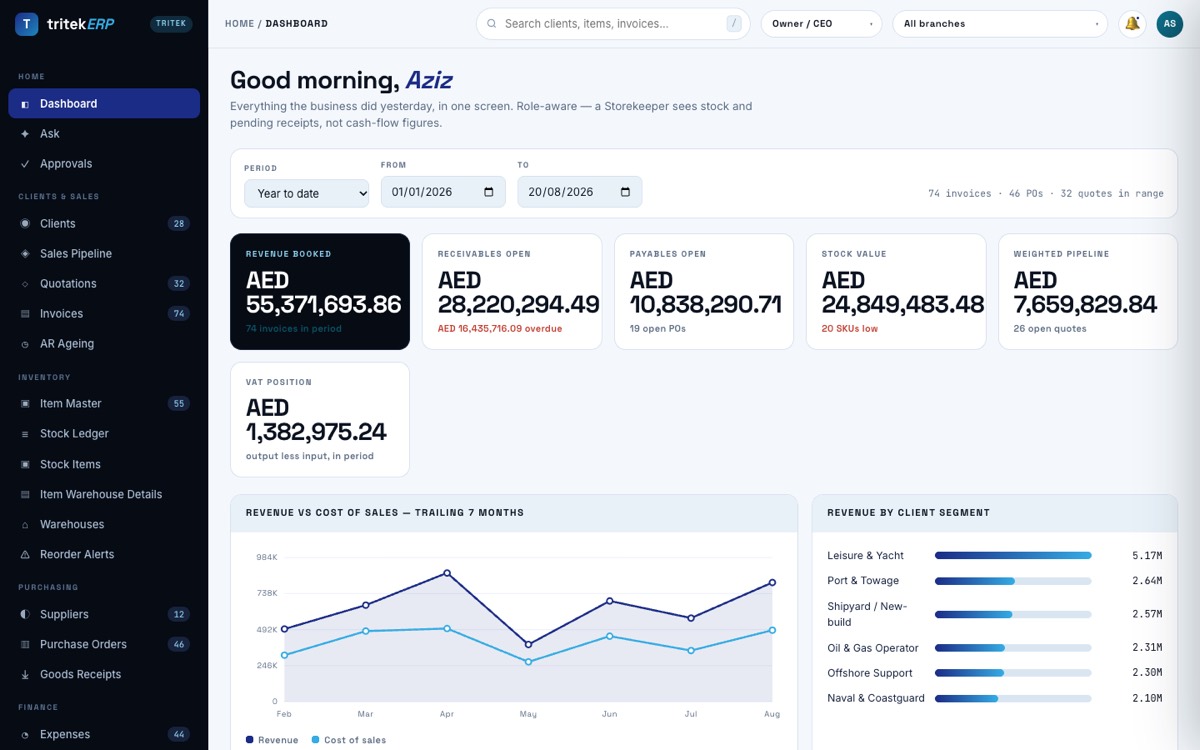
Tritek ERP demo dashboard showing revenue, receivables, payables, stock value and pipeline tiles, with inventory, purchasing and finance menus
Tritek ERP demo, Owner / CEO dashboard. All figures are sample data.
Key facts

What exists, in plain numbers.

The brief

Rent an ERP forever, or own one?

Tritek asked to choose between renting a packaged ERP and owning one built around how they work. Their work is not a shop counter. It is parts, panels and engineers moving between sites and vessels.

Stock in five places

Parts move every week

Dubai Maritime City, JAFZA bonded, the panel workshop, Mussafah and van stock. A stock figure is only true if every move between them is recorded.

Work is per vessel

Jobs sit on a hull

New-builds, retrofits and service calls are tracked against a named vessel with IMO number, hull type and class society, with budget against actual.

Spreadsheets today

Data has to come in on day one

If staff cannot load their existing sheets, they keep the sheets. Then the company runs two systems instead of one.

What was built

91 screens on paper. 36 you can click.

The blueprint lists every screen, who uses it and when it gets built. The Tritek demo turns the core of it into working screens that keep state, validate input and export files.

Core & access · 8Clients & CRM · 8Sales · 10Inventory · 11Purchasing · 8Finance · 10People · 8Vessels & Jobs · 11Data in / out · 5Admin & security · 8Reporting · 4
Inventory

Stock Items, the Acumatica way

General, Price/Cost, Warehouses, Vendors, Attributes, Packaging, Cross-Reference, Related Items, Inventory Planning and GL Accounts tabs. 187 item-warehouse records across the five sites.

Documents

Quotes, invoices, POs

Line-item documents where totals come from the lines, never typed. Printable on letterhead with stamp and signature. Supplier statements for one, several or every supplier.

Upload

Create from a file

PDF, Excel or CSV read and matched to master data, with confidence per field and per line, for POs, invoices, quotations, items and expenses.

Tax & finance

VAT and corporate tax

FTA VAT box layout by quarter and the 9% corporate tax computation with the 375,000 relief band. P&L, financial position and cash flows in auditor layout.

Control

Approvals and activity log

Approval ceilings by role, enforced in the decision function. Every change logged with user, role, screen, time and field-level before and after.

Ask

Questions in plain English

Ask a question, get the answer from the live data, with every row behind the figure shown and exportable. Plus a compliance register for licences, visas and tenancies.

How it is put together

Boring tech, on purpose.

Every choice is widely used and easy to hire for. That matters more than speed for software a company will run for ten years.

Stack

One database, typed end to end

  • Next.js 15, React 19 and TypeScript on the front end
  • Node API on tRPC, validation in one place next to the schema
  • PostgreSQL 16 with row-level security and audit triggers
  • Redis queues for imports, PDFs, emails and scheduled reports
  • S3-compatible storage for invoices, receipts and staff documents
Data model

About 45 tables

  • Stock is a ledger: movements are append-only and the balance is derived
  • Invoices are gapless, VAT is computed per line, posted invoices are never edited
  • PO, goods receipt and bill go through a three-way match
  • Emirates ID, passport and IBAN are encrypted at column level
  • The audit log is insert-only, kept for seven years
Import / export

Spreadsheets in, files out

  • Drop a CSV, Excel or PDF, map columns, validate, then commit in one transaction
  • Bad rows go to an error queue with the line number and a plain reason
  • Re-running the same file adds nothing twice
  • Export to CSV, Excel, PDF or JSON, with masked fields never selected
Security & hosting

14 controls, 3 hosting options

  • MFA on every write role, role-based access in the database
  • Field masking for cost, salary, IBAN and Emirates ID
  • Encryption in transit and at rest, tested backups, maker-checker approvals
  • Host on one VPS, a managed platform, or a UAE cloud region (AWS me-central-1 or Azure UAE North) when residency is required
Delivery plan

16 weeks, each with a test you can watch.

Phase 1 ends at week 8. The business could run on it from there. Every week has a definition of done you can see, not a percentage.

  1. Week 1Schema, sign-in, roles

    Sign in as three roles and see three different menus.

  2. Weeks 2 to 3Clients, items, suppliers, import wizard

    Real master data loaded from the existing spreadsheets.

  3. Weeks 4 to 5Purchase order, goods receipt, stock ledger

    A real shipment is received and the stock figure is correct and provable.

  4. Weeks 6 to 7Quotation, invoice, receipt, receivables ageing

    A real VAT invoice raised and a real payment recorded against it.

  5. Week 8Reports, export centre, PDF pipeline

    Phase 1 complete.

  6. Weeks 9 to 12Ledger, VAT review, payroll and WPS, job costing

    The trial balance nets to zero, the accountant checks the VAT quarter, the bank accepts a test salary file.

  7. Weeks 13 to 14Approvals, backup drill, penetration test

    The database is restored from backup and works. Test findings are closed and retested.

  8. Weeks 15 to 16Migration, parallel running, training, cutover

    Both systems produce the same closing balances before the old one goes read-only.

Build audit · 21 August 2026

What was built, what was not.

I checked the demo screen by screen against the inventory scope of Acumatica Distribution Edition. The source was 213 frames from the Storylane walkthrough Tritek sent, nine screenshots of the Stock Items tabs and Acumatica's published screen numbers. The requested video could not be opened, and the audit says so.

25built
6partial
8not built
36screens live

On the inventory scope alone: 15 built, 6 partial, 8 not built. The other 10 built areas are business screens outside that scope, such as VAT, financial statements and vessel jobs.

AreaStatusDetail
Stock Items, 10 tabs (IN202500)BuiltGeneral, Price/Cost, Warehouses, Vendors, Attributes, Packaging, Cross-Reference, Related Items, Inventory Planning, GL Accounts. All editable and saved.
Item Warehouse Details (IN204500)Built187 records with General and Inventory Planning tabs.
Warehouses (IN201000)BuiltFive sites with bins.
Inventory summary, transaction history, reportsBuiltItem master, stock ledger with running balance, reorder alerts, all exportable.
Item Classes, Price ListsPartialData drives defaults. No separate maintenance screen or effective-dated price lists.
Receipts, Lot / Serial, Allocation, Cost HistoryPartialData exists and is used. The dedicated screens do not.
Transfers (IN304000)Not builtThe most important gap. Without it, stock moved between sites is invisible.
Issues, Adjustments, Physical CountNot builtNo way yet to issue spares to a job, write off damage or run a stock count.
Non-Stock Items, Kit Assembly, Stock Ageing, Manufacturing tabNot builtDeferred. Tritek does not run production orders, so manufacturing was left out on purpose.
Build next, in this order
  • Inventory transfers: 2 to 3 days
  • Issues and adjustments: 2 days
  • Physical inventory count: 3 days
  • Serial number tracing: 3 to 4 days
Two things the demo is not
  • The sign-in is not access control. It sits in browser code on a static page, so no real Tritek data goes in it.
  • Scans and photos are not read. PDFs with a text layer are. OCR needs a server, which the production build adds.
Questions

Custom ERP in the UAE, answered.

How long does a custom ERP take for a UAE SME?

The Tritek plan runs 16 weeks. Phase 1 covers 43 screens in weeks 1 to 8 and can run the business end to end: take an order, hold stock, buy more, invoice, get paid. Weeks 9 to 16 add finance, VAT, payroll, job costing, a penetration test, data migration with a month of parallel running, then training and cutover.

Is the Tritek ERP live in production?

No. What exists today is a 91-screen blueprint, a working demo with 36 live screens and a build audit dated 21 August 2026. The demo runs in the browser on sample data. The production build, with a server, real access control and OCR, is the one described in the proposal.

How does the Tritek demo compare with Acumatica?

The build audit checked it against the inventory scope of Acumatica Distribution Edition. Counting the extra business screens, 25 areas are built, 6 partial and 8 not built. On inventory alone, 15 are built, 6 partial and 8 not built. The biggest gap is warehouse transfers.

What database and tech stack does the ERP use?

PostgreSQL 16 as the single database with row-level security and audit triggers, Next.js and TypeScript on the front end, a typed Node API, Redis queues for imports and PDFs, and S3-compatible storage for documents. About 45 tables in total.

Can a custom ERP import my Excel, CSV and PDF files?

Yes. Files go through map, validate, error queue and commit in one transaction, and re-running the same file does not create duplicates. PDFs with a text layer are read in the demo today. Scans and photos need OCR on a server, which the production build adds.

Where is the ERP hosted and is UAE data residency possible?

The blueprint compares three options: one VPS, a managed Postgres platform, or a UAE cloud region such as AWS me-central-1 or Azure UAE North. The recommendation is to start managed and move to the UAE region when a contract or regulator asks for residency.

Want an ERP shaped like your business?

Send me the screens you use today, or a walkthrough of the system you are thinking of buying. I will map it the same way: blueprint, working demo, then an honest audit of the gaps.