Your second brain, step by step.
16 steps in the order the video shows them. Left: what the video explains. Right: what to do. Each step has a small ▶ timestamp link. The giveaway and community parts of the video are left out.
▶ Original video: Ray Fu, "Complete Guide to building an AI Second Brain with Claude", 12 min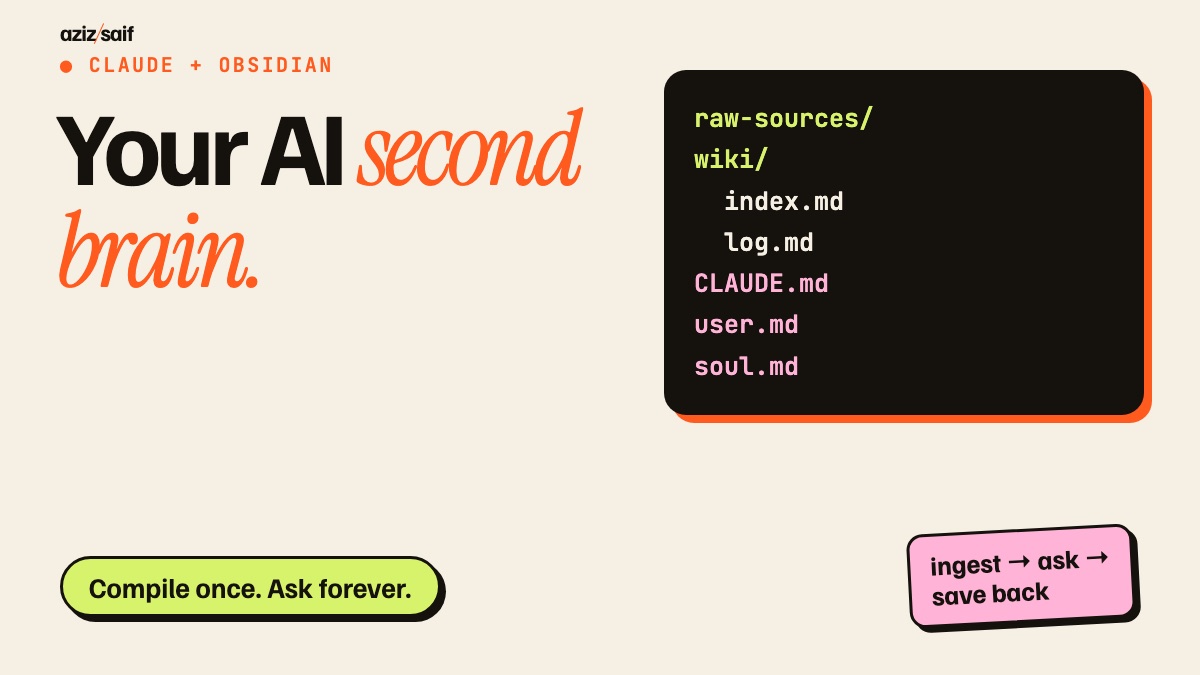
Ray, a former Meta engineer, says his second brain indexes every meeting, sorts his inbox and saves him at least 15 hours a week. He calls it the first thing any beginner should build with AI.
- Write down the three things you lose track of most: meeting actions, saved articles, client details.
- Those are what your brain will hold first.
He tried Notion, Apple Notes and Google Drive and dropped all of them. He spent 10 hours a week sorting notes by hand. The problem was using the apps to store things, not as a system that does something with them.
- Keep your old apps. You do not need to move everything.
- Export a handful of notes you actually care about. That is enough to start.
Andrej Karpathy posted about building a personal knowledge base with AI and it went viral. Most people who tried it failed or did not know how to use it. The point: it remembers what you added months ago, like a tutorial you forgot, and nudges your goals forward.
- Think of it as a memory you can talk to, not a filing cabinet.
NotebookLM, ChatGPT file uploads and vector databases all work the same way. Upload files, ask, the AI pulls a few chunks and writes an answer. Every question starts from zero. A question that needs five documents from three months gets pieced together again each time, and the work is lost when you close the tab.
- Keep using NotebookLM for one-off research on a pile of PDFs. It is good at that.
- Use the second brain for things you will come back to.
His comparison: raw notes are the inputs, Claude Code is the programmer, the wiki is the codebase and Obsidian is the editor you view it in. A new source is not just stored. Claude reads it, pulls out the people, ideas and facts, and works them into the pages that already exist. The dull part, cross-links and summaries, is Claude's job.
- Never edit the wiki pages by hand at first. Let Claude own them so the structure stays tidy.
Obsidian is a free markdown editor with folders and a graph view, on desktop and phone. Then a Claude subscription and the Claude desktop app, which reads the files, runs the scripts and keeps the wiki. He says Codex works too if you prefer ChatGPT.
- Install Obsidian from
obsidian.md. - Install the Claude desktop app and open the Code tab.
- Install Obsidian on your phone too so you can drop notes from anywhere.
Open folder as vault, name it (his is RayBrain). Dumping everything in one folder made Claude hallucinate. He says his answers were about 60% right that way and about 95% after he set strict folders. The first folder, raw-sources, holds articles, PDFs, call transcripts, screenshots and papers. Claude may read it but never edit or delete it.
- Obsidian → Open folder as vault → new folder, any name.
- Create
raw-sources/. - Write the read-only rule in CLAUDE.md (step 9).
The second folder, wiki, is the opposite. Claude owns it: concept pages, people and company pages, comparisons. Inside are two system files. index.md lists every page with a link and one-line summary, grouped by category, and Claude reads it first on every question. log.md is a dated record of every ingest, query and health check.
- Create
wiki/with emptyindex.mdandlog.md. - Leave them empty. Claude fills them on the first ingest.
CLAUDE.md sits in the root of the vault. It tells Claude how the brain is laid out, what the rules are and which commands to follow. His exact prompt is in his own free guide, linked under the video. Paste it in and Claude knows the rules.
- Create
CLAUDE.mdin the vault root. - Use his guide, or start with our starter version below.
Without these Claude still answers like a generic chatbot. Three files in the root. user.md says who you are and how you like answers, his asks for numbers over vague words and simple systems over complex ones. soul.md says who Claude is to you, his is a blunt chief of staff that challenges him and never hedges. anti-ai-style.md is a banned list. Each time a draft uses a phrase he hates, he adds it.
- Do not type them. In Claude, turn on voice mode and say:
Interview me one question at a time to write user.md, soul.md and anti-ai-style.md for my second brain. Ask about my work, goals, how I like answers and words I never want to see. - Talk for 15 minutes. Claude writes the files.
He installs the official Obsidian Web Clipper in Chrome and sets its destination folder to raw-sources. One click saves an article there. Then one command from his guide and Claude scans the raw files, writes a page per concept in the wiki, builds the index, logs the run and links everything with Obsidian wiki links. The raw files stay untouched.
- Chrome → install Obsidian Web Clipper → settings → folder:
raw-sources. - Open the vault folder in the Claude Code tab and type:
Ingest every new file in raw-sources. Follow CLAUDE.md. - Each time you add something:
I added a new source. Update the connected wiki pages.
Obsidian's graph view shows every concept joined by lines. When you ask Claude something it does not search every file. It opens index.md, finds the right cluster, follows the wiki links and gives one answer with exact citations.
- Obsidian → Graph view, to see what is linked and what is alone.
- Ask:
Using the wiki only, what do I know about [topic]? Cite the pages.
Always save good answers back into the wiki as new pages. A strong comparison table or breakdown should not vanish with the chat. Each question then makes the next answer better.
- After a good answer:
Save this as a new wiki page, link it to related pages and update index.md.
One: a 7:30 AM brief from a simple cron job, so the day starts with a short summary, not an inbox. Two: drop meeting transcripts into raw-sources and have Claude file the key points, actions and decisions. He has 10 to 15 meetings a day and connects a meeting note-taker (he uses Fireflies) so transcripts sync by themselves. Three: a weekly health check that stops "context rot", catching wrong pages before they spoil later answers.
- Code tab → Scheduled → new task at 7:30:
Read log.md and today's new raw-sources. Give me a 10-line brief of what needs me. - Connect your meeting note-taker under Customize → Connectors.
- Weekly task:
Health-check the wiki. Find wrong, stale, duplicate or unlinked pages, fix them and log what changed.
Install the free Obsidian Git community plugin and set it to commit and push the vault to a private GitHub repo every 15 minutes. You get a cloud backup and full version history on every device.
- Make a private GitHub repo. Your notes are personal.
- Obsidian → Community plugins → Obsidian Git → auto commit and push every 15 minutes.
You do not need it all in one day. Make the folders, add CLAUDE.md and run your first ingest.
- Today: folders + CLAUDE.md + five sources + first ingest.
- This week: identity files and one save-back.
- Next week: the morning brief and Git backup.
Starter CLAUDE.md
Our version, not from the videoA short version you can paste today. Swap in your own details later.
# My second brain

## Layout
- raw-sources/  my inputs. READ ONLY. Never edit, move or delete.
- wiki/         yours. One page per person, company, project or idea.
- wiki/index.md every page: [[link]] + one-line summary, grouped by category.
- wiki/log.md   one dated line per ingest, saved answer or health check.
- user.md, soul.md, anti-ai-style.md  read these before writing anything.

## Ingest (when I say "ingest" or "new source")
1. Read each new file in raw-sources.
2. Update existing wiki pages first. Make a new page only if none fits.
3. Link related pages with [[wiki links]]. Note the source file on each fact.
4. Update index.md and add a line to log.md.

## Answering
- Open index.md first, then the linked pages. Cite the pages you used.
- If the wiki does not know, say so. Do not guess.
- When I say "save this", write it as a wiki page and update index.md.

## Health check (weekly)
- Find wrong, stale, duplicate or unlinked pages. Fix them. Log what changed.
FAQ
What is an AI second brain?
A folder of plain notes that Claude reads once and turns into a linked wiki about you and your work. Each new source and each good answer is added, so the wiki gets more useful over time.
How is this different from NotebookLM or uploading files to ChatGPT?
Those tools search your files again for every question and keep nothing after you close the tab. Here Claude writes the summary into wiki pages once and keeps them up to date.
What do I need?
Obsidian, which is free, and a Claude subscription with the desktop app. The video says Codex also works if you prefer ChatGPT.
Can Claude delete my original notes?
Not if you set the rule. raw-sources is read only for Claude. It only writes inside the wiki folder. Back the vault up to a private GitHub repo as well.
How do I keep the wiki accurate?
Run a weekly health check where Claude looks for wrong, stale or duplicate pages and fixes them, and keep a log.md of every change.
Hands-on Claude sessions in Dubai, Abu Dhabi and Saudi Arabia, using your own files.
Corporate Claude training →A4 PDF ↓